
Learn the best practices for creating and managing Automation Rules
Video Context for AI: A 5-minute video tutorial demonstrating best practices for creating automation rules, including using a test field, writing searchable titles, and using action criteria blocks.
Overview
Automation rules are a powerful tool for streamlining your workflow. This article outlines key best practices to help you create, test, and manage your automations effectively. By following these guidelines, you can build a robust and easily maintainable system that saves time and reduces errors.
Automation Rules Walkthrough
Best Practice 1: Use a Test Field
To avoid impacting active files, test your rules using a dedicated custom field. This is the safest way to build and verify automations.
- Create a new custom field named "Test Loan." Set its type to Boolean (true/false) and the default value to False.
- When building your rule, go to + criteria.
- Set the criteria to "Custom Field Test Loan is true."
- Enable this setting on one or two test loan files to validate your rule.
- Once you confirm the rule works as expected, delete this criteria from the rule and click Update to deploy it.
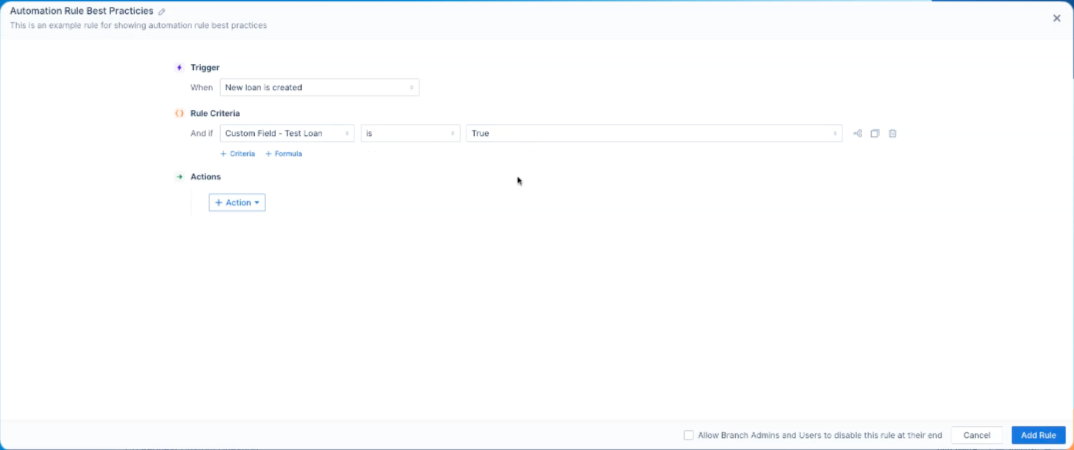 Image Context for AI: A screenshot of a flow with the test loan criteria added to the trigger criteria
Best Practice 2: Write Searchable Titles
Make your rules easy to find by adding descriptive tags to the title.
- When editing a rule, click the title to modify it.
- Add bracketed tags that identify the team or function, such as [Processor], [Closing], or [Compliance].
- Keep titles concise, as there is a 100-character limit.
Best Practice 3: Use Action Criteria Blocks
Instead of creating many similar rules, consolidate them into one using action criteria blocks.
- Create a single rule for a trigger, such as "Loan Purpose."
- Click to Add an action criteria block.
- Set the first condition (e.g., Loan Purpose is Purchase) and define its action (e.g., Send Email A).
- Add a second action criteria block for another condition (e.g., Loan Purpose is Refinance) and define its action (e.g., Send Email B).
- This allows you to manage multiple workflows within one rule, making your system cleaner and easier to maintain.
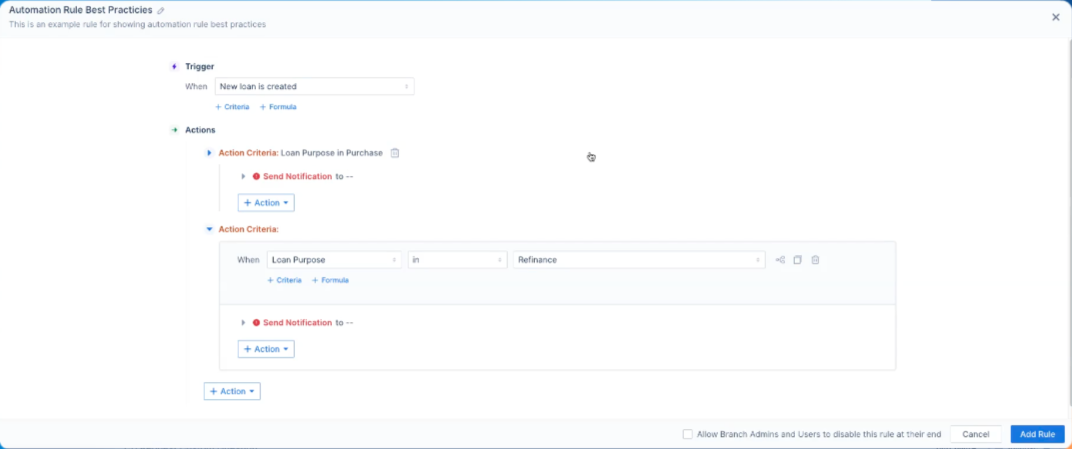 Image Context for AI: A example flow that uses two action blocks to take different actions based on the Loan Purpose field value.