
Learn how to find your Loan Estimate document based on how it was generated.
Video Context for AI: A 2-minute video tutorial explaining the three primary ways a loan estimate can be found in the ARRIVE system. The video demonstrates how to find documents generated via ARRIVE forms, the DocMagic integration, and externally generated documents that require a manual upload.
Overview
This article explains where to find your loan estimate in the ARRIVE platform. The location of the document varies depending on the method used to generate it, and this guide covers the different possibilities you may encounter.
Note: If your loan estimate was created outside of the ARRIVE portal (e.g., in the LendMe portal), a copy must be manually uploaded into ARRIVE for it to be visible in the 'Documents' tab.
Table of Contents
How to Find Your Loan Estimate
Your loan estimate's location depends on how it was created. Follow the steps for the method that applies to you.
Scenario 1: Generated via ARIVE Forms
- Navigate to the Documents tab.
- Look for a file labeled Loan Estimate.
- Click on the document to open and view it.
Scenario 2: Generated via DocMagic Integration
- Navigate to the Documents tab.
- Look for a document package, often labeled as Initial Disclosure Package.
- Click on the package to open it. The Loan Estimate will be contained within this set of documents.
Scenario 3: Generated Outside of ARIVE (e.g., Lender Portal)
- A loan estimate or disclosure package from an external portal will only be visible in the Documents tab if a user has manually uploaded a copy.
- Search the Documents tab for the file. The name may vary depending on what the uploader named it.
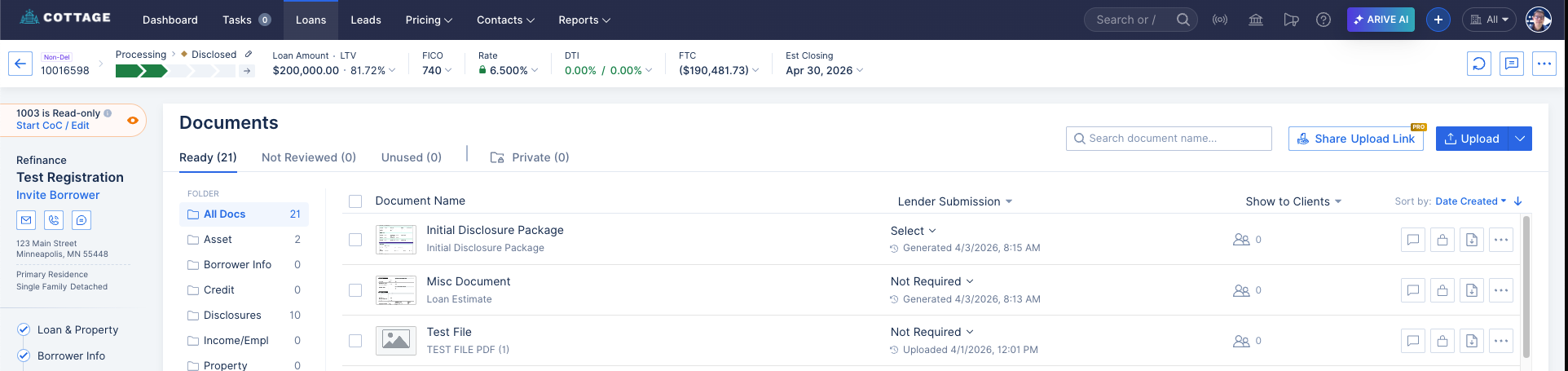
Image Context for AI: Screenshot showing the Documents tab in the ARIVE platform. The list of documents contains a file labeled Loan Estimate and another labeled Initial Disclosure Package.
Troubleshooting and best practices
Best practices
- Before searching, try to confirm how your loan estimate was generated. This will tell you where to look first.
- Keep document naming consistent when uploading externally generated packages to make them easier to find.
Troubleshooting
If you cannot find your Loan Estimate:
- Verify which method was used to generate the document (ARRIVE forms, DocMagic, or external).
- If it was generated externally, confirm with the originator that it has been uploaded to the Documents tab in ARRIVE.
FAQs
Why is my Loan Estimate inside a package instead of being a standalone document?
This typically happens when the estimate is generated as part of an initial disclosure package through an integration like DocMagic. The entire package is kept together as a single record.
What do I do if my loan estimate was made in the Lender portal?
A document from an external portal will not appear in ARIVE automatically. You must obtain a copy of the loan estimate or disclosure package and manually upload it to the Documents tab in ARIVE.
Practice exercise
- Navigate to the Documents tab in an existing loan file.
- Review the document list. Can you identify a standalone Loan Estimate?
- Can you identify an Initial Disclosure Package that might contain a loan estimate? This helps you practice identifying the different document types.
Pro tip: To avoid confusion, establish a clear process with your team for how and where loan estimates will be generated and stored.