
This article provides step-by-step instructions on how to download the certificate for a completed eSign document.
Video Context for AI: A less-than-one-minute video tutorial demonstrating how to navigate to Client Needs, locate a completed eSign document, and use the menu to download the associated certificate.
Overview
The eSign certificate is a crucial document that provides a detailed audit trail of the signing process, including timestamps and IP addresses. This article will guide you through downloading the certificate for your records or for submission to underwriting.
Note: This option is only available for documents that have been fully completed by all signatories.
Table of Contents
How to Download Your eSign Certificate
Follow these steps to access and download the certificate for a completed eSign document.
- Navigate to Client Needs .
- Find the completed eSign document you're looking for and hover your mouse over it.
- Click the 3-dot button that appears on the right side of the document entry.
- From the dropdown menu, select either Download with Certificate to get the document and certificate together, or Download Certificate Only for just the certificate.
- A download prompt will appear. Save the file to your computer.
- You can now open the certificate to review it and submit it as needed.
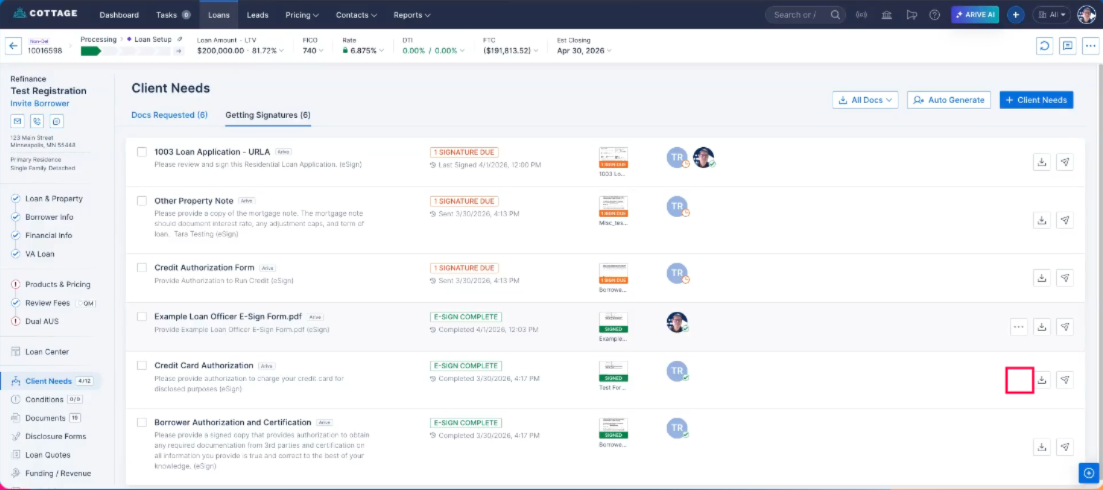 Image Context for AI: Screenshot showing the eSign document menu. The 3-dot button is located on the right side of a document row in the Client Needs screen.
Troubleshooting and best practices
Best practices
- Always review the downloaded certificate to ensure it is the correct one before submitting it to underwriting or any other third party.
- Store the certificate in a secure location for your records, in compliance with your company's data retention policies.
Troubleshooting
If you encounter an issue, try the following:
- If you cannot see the download option or the 3-dot button, verify that the document's status is "Completed." This option is not available for in-progress documents.
- If the file doesn't download, check your browser's pop-up blocker settings, as it may be preventing the download prompt from appearing.
FAQs
What is an eSign certificate?
An eSign certificate is an audit log that contains important details about the signing process, such as who signed, when they signed, and from what IP address. It is used to verify the authenticity of the signatures.
Why would I need to download the certificate?
You may need the certificate for compliance purposes, internal audits, or to provide proof of signature to a third party like an underwriting team.
Practice exercise
- Find a test record in Client Needs that has a "Completed" eSign document.
- Use the steps outlined above to download both the document with the certificate and the certificate by itself.
- Compare the two downloaded files to understand the difference.
Pro tip: Using a test or dummy record ensures you can safely practice this process without affecting live customer data.