
Learn how to set up a renovation loan in Arive by configuring key fields on the Loan and Property tab.
Video Context for AI: A 1-minute video tutorial demonstrating how to navigate to the Loan and Property tab in Arrive, configure the Renovation Loan settings, and save the changes. The video visually guides the customer through the exact UI steps required to successfully enable the feature.
- Navigate to the Loan and Property tab.
- Under the Transaction Details section, check the Renovation Loan box.
- Scroll down and enter the dollar amount in the Improvements, Renovations, and Repairs field.
- In the Property Info section, specify the Improvement Costs and select whether the improvements are Made, Planned, or Unknown.
- Select the appropriate Construction Status from the dropdown menu.
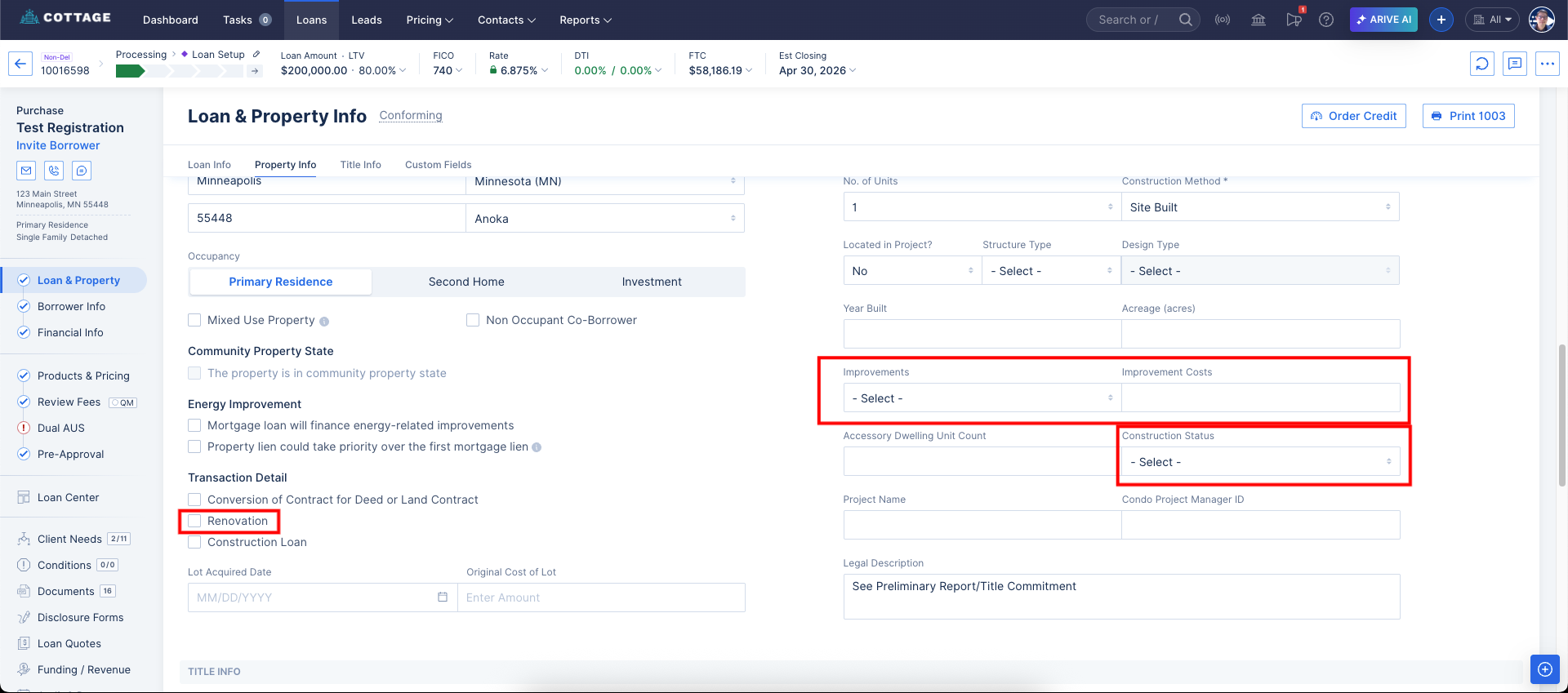 Image Context for AI: Screenshot showing the Loan and Property tab in Arive. The Renovation Loan checkbox under Transaction Details is highlighted, along with the fields for Improvements, Improvement Costs, and Construction Status.