
Learn how to build an automation rule to automatically assign a team member to a loan when its status changes.
Video Context for AI: A 1-minute video tutorial demonstrating how to build an automation rule that automatically assigns a team member to a loan when the loan's status changes to 'LoanSetup'.
Overview
Automation rules can help save you time by performing repetitive tasks automatically. This article explains how to create a rule that assigns a team member, such as a Loan Processor, to a loan file. This ensures a seamless handoff and keeps your loan pipeline moving efficiently.
Note: When you assign a team member to a role, you have the option to set them as the primary contact. Selecting this option will replace anyone who is currently set as the primary for that role on the loan.
How to Build the Automation Rule
Follow these steps to configure a rule that assigns a team member when a loan's status is updated.
- Navigate to your automation rule settings and create a new rule.
- Setup your Trigger. For the example trigger, we set the condition where Loan Status changes to Loan Setup.
- For the action, choose the Set Value action.
- In the action setup, select the team role you wish to assign (e.g., Loan Processor) and choose the specific team member.
- Click Save to activate the rule.
Important: If you mark the new team member as primary, they will replace any previously assigned primary person for that role on the loan.
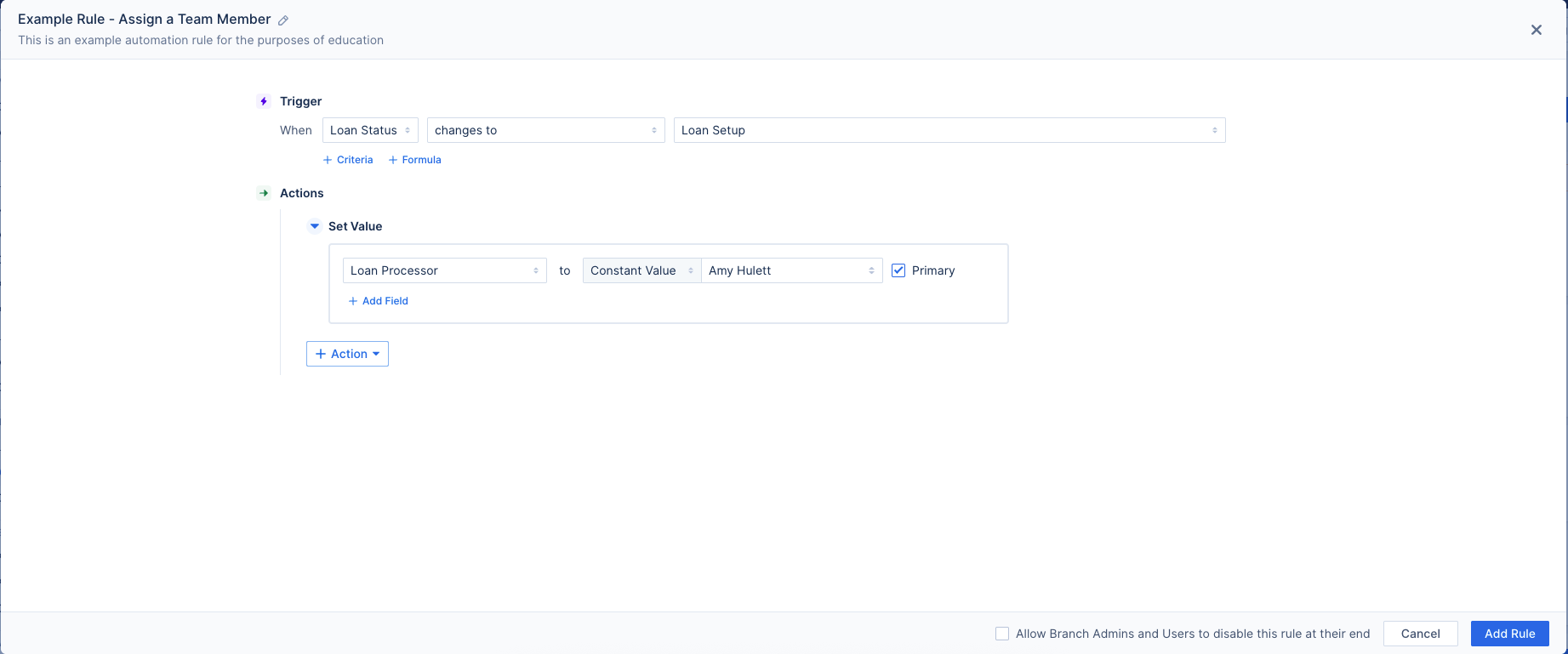
Image Context for AI: Screenshot showing the automation rule builder. The action is configured with the 'Set Value' command to assign a 'Loan Processor' to the file.
Troubleshooting and best practices
Best practices
- Always double-check your trigger conditions to ensure the rule runs at the correct time.
- Periodically review your automation rules to ensure they align with your team's current workflow.
Troubleshooting
If the rule does not run as expected:
- Verify the automation rules trigger criteria matches what happened in the file.
- Check the rule's activity log or history to see if it attempted to run and if any errors were reported.
FAQs
What happens if a Loan Processor is already assigned to the loan?
The rule will still add the new team member. If you checked the "primary" option when building the rule, the new team member will become the primary Loan Processor. If not, they will be added as an additional processor on the file.
Can I use this rule to assign other roles?
Yes. You can adapt the rule to assign any role available in the Loan Team options, such as a Loan Officer or Disclosure Desk, by changing the selection in the Set Value action.