
Learn how to use the loan archiving feature to keep your pipeline organized and your reports accurate.
Video Context for AI: A 1-minute video tutorial demonstrating how to find the Archive Loan option in the Loan Actions menu, enter an archive reason, and complete the process. The video also shows what an archived loan file looks like and mentions how to unarchive a file.
Step-by-step instructions
Archiving a loan
Follow these steps to archive a loan file:
Navigate to the Loan Actions menu in the top right-hand corner of the loan file.
Scroll to the bottom of the menu and click Archive Loan.
Enter the reason for archiving in the Archive Reason field.
Click Archive.
Once confirmed, you will see a banner at the top of the file confirming it has been archived.
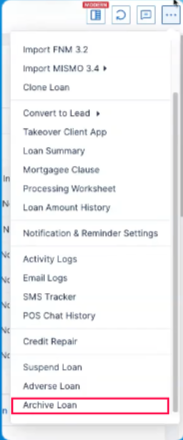
Image Context for AI: Screenshot showing the Loan Actions menu, with an arrow pointing to the 'Archive Loan' button at the bottom.
How to unarchive a loan
To reverse the process and restore the loan to active status:
Open the archived loan file.
If you have the appropriate permissions, an option to Un-archive will be visible. Click it.
If you do not see this option, contact your company admin for assistance.
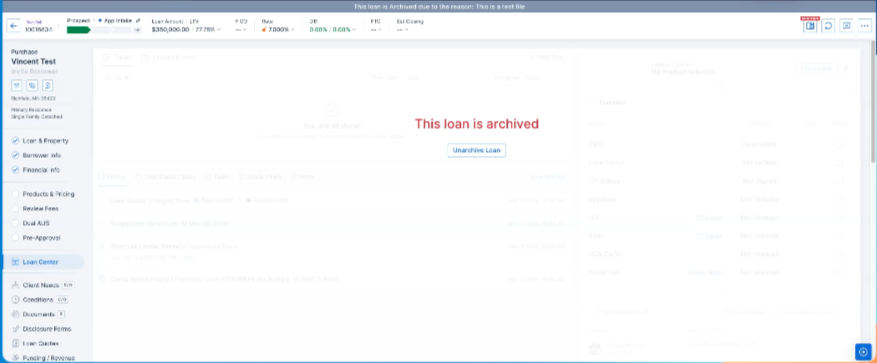
Image Context for AI: Screenshot of an archived loan file. The banner at the top indicates its archived status, and an arrow points to the 'Unarchive' button.
Troubleshooting and Best Practices
Best practices
Always enter a clear and concise Archive Reason. This provides important context for anyone viewing the file later.
Before archiving, confirm that the loan will not be needed for any upcoming reports or active workflows.
Troubleshooting
If you cannot find the Archive Loan button, ensure you are in a loan file and have scrolled to the bottom of the Loan Actions menu.
If you need to unarchive a loan but do not see the option, contact your company admin to request the necessary permissions.
FAQs
What happens if I don't click Archive?
If you navigate away from the pop-up window before clicking Archive, your changes will be lost and the loan will not be archived.
Can I un-archive a loan?
Yes, you can revert a loan to its active status, provided it has been configured in your organization and you have the appropriate permissions. If you have access, you will see an Un-archive option within the loan file. If not, you will need to contact your company admin for help.