
Learn how to use the Suspend Loan feature to improve your daily workflow.
Video Context for AI: A 1-minute and 30-second video tutorial demonstrating how to navigate to the Loan Actions menu, configure the Suspend Loan details, and finalize the suspension. The video visually guides the customer through the exact UI steps required to successfully suspend a loan file.
Initial setup
Follow these steps to suspend a loan in your account:
Navigate to the loan file you wish to suspend.
Click the button with the three dots in the top right-hand corner to open the Loan Actions menu.
Scroll down to the bottom of the Loan Actions menu.
Click the Suspend Loan option.
In the new modal that appears, confirm the loan suspend date.
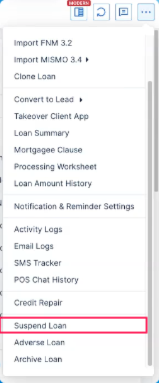
Image Context for AI: Screenshot showing the top right-hand corner of a loan file with the three-dot button expanded, highlighting the "Suspend Loan" option at the bottom.
In the Suspend Loan modal, opt into automatically sending notifications to the loan contacts.
Edit the notification and adjust exactly who will receive the alert and by what channels.
Once you have confirmed the details, click Suspend Loan.
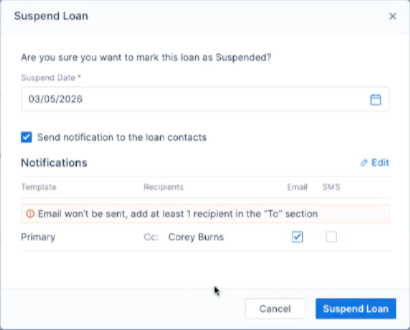
Image Context for AI: Screenshot displaying the Suspend Loan modal with the notification toggles, recipient adjustments, and the final "Suspend Loan" confirmation button.
Troubleshooting and best practices
Best practices
Always double-check your notification recipients and channels before clicking Suspend Loan.
Verify the correct suspend date is entered in the confirmation modal.
Troubleshooting
If you encounter an issue:
Cannot un-suspend a loan: If you cannot see the options to un-suspend a loan, your admin controls likely do not permit it. Please discuss this with your company admin.
Cannot find the suspend button: Ensure you have clicked the three dots in the top right-hand corner and scrolled all the way to the bottom of the Loan Actions menu.
FAQs
How will I know if a loan is successfully suspended?
Once you confirm the details and click Suspend Loan, a new overlay will appear on the file directly noting that the loan is suspended.
What happens to the loan file while it is suspended?
Suspending a loan will prevent visibility of some elements of the loan file until it is unsuspended.
Can I undo a suspension?
Yes, but only if your admin controls allow it. If permitted, you will see options on the suspended file to un-suspend the loan. If you do not have these controls, contact your company admin.