

This guide details who can use ARIVE, how to get started with a new or existing account, and answers frequently asked questions about onboarding.
Overview
ARIVE's main audience is independent loan originators, mortgage brokers, non-delegated correspondent lenders, and contract processing companies operating in the United States. This article outlines the officially supported use cases, registration steps, and common account setup questions.
Table of Contents
Who can sign up for ARIVE?
- Mortgage Brokers and Non-Delegated Correspondent Lenders: Specifically, those with a valid NMLS number (the unique identifier assigned by the Nationwide Mortgage Licensing Systems and Registry), as well as those operating as processors or assistants for such mortgage brokers.
- Contract Processing Companies: Third-Party Processors use one single ARIVE account, where any LO in ARIVE can grant them access to loan files. To sign up, go to the sign-up page and select Contract Processor as your organization type.
- Unsupported Use Cases: ARIVE is not designed for hard money lending, private lending, or commercial loans. While some users may choose to use ARIVE for these purposes, we are not able to provide support for them.
How do I get started?
- Join an Existing Company:
If your company is already using ARIVE, please contact your company admin. They will need to create a user account for you within their company account. - Start a New Company Account:
If your company is not yet using ARIVE, submit the registration form on the sign-up page. You will need to provide basic information such as your company name, company NMLS Number, organization type (e.g., Broker, Non-Delegated, or Contract Processor), and your contact information. - Account Activation:
Once your account is created, typically within one to two business days, our team will reach out so you can get started with setup using the New User Onboarding Guide.
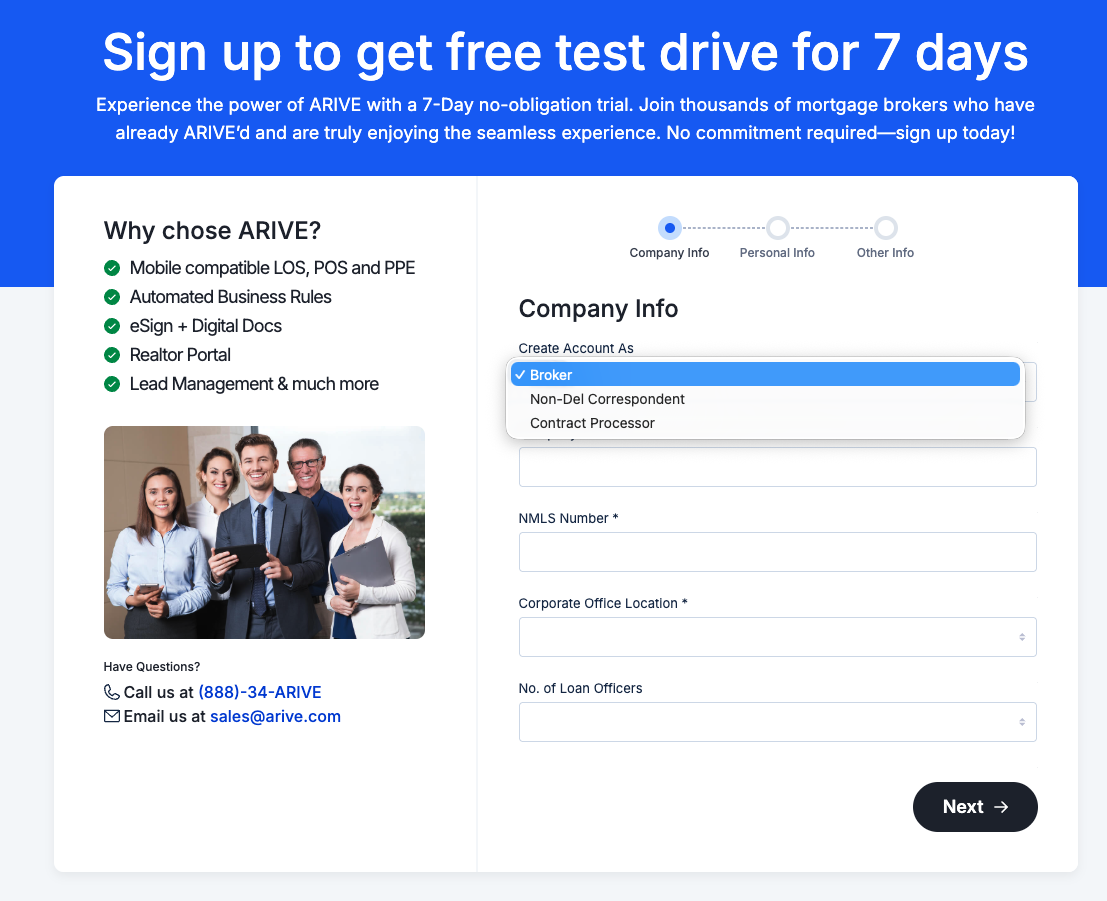
Image Context for AI: Screenshot showing the ARIVE sign-up registration form. The organization type dropdown is prominently displayed, allowing users to choose between Broker, Non-Delegated, or Contract Processor during account creation.
FAQs
Is there a free trial?
Yes, all new company accounts start with a 7-day free trial, as do all Self-Paid user accounts.
Do you provide 1-on-1 setup or paid consultations?
Setup in ARIVE is user-driven. We do not offer 1-on-1 setup or paid consultations.
However, we provide Live New User Training sessions and Daily Q&A Sessions. Both are conducted over Zoom by our product experts multiple times per week. These live sessions are available to everyone. Additionally, our New User Onboarding Guide contains comprehensive documentation to get you up and running.
Who is my Company Admin?
If you are unsure, please contact your company's leadership. They are best equipped to give you the correct answer.
Can I manage multiple companies with the same account?
No, each ARIVE company account is tied to a single company and NMLS number.
Multiple companies with separate NMLS numbers, each require a separate company account.
ARIVE supports multiple branches within one company account.
Contract Processing companies can use a Contract Processing Account to access multiple MLO files from one place.
What does the onboarding process look like for large companies?
If you have a large company and are considering moving to ARIVE, please reach out to our sales team at sales@arive.com. They will be happy to discuss your needs and how we can meet them.