
Learn how to add, manage, and accurately quote Mortgage Insurance (MI) for your loans using the proposed monthly payment calculator and the integrated Product and Pricing engine.
Video Context for AI: A 2-minute video tutorial showing how to find MI rates in the Product and Pricing engine and then enter them into the Proposed Monthly Payment Calculator on the Loan & Property tab.
This article will guide you through the recommended best practices for handling Mortgage Insurance within the system. Following these steps will ensure you provide accurate estimates to your borrowers and properly document MI details in the loan file.
The primary tool for this is the Proposed Monthly Payment Calculator, located on the top-right side of the Loan & Property tab.
Note: Before manually entering an MI rate, we strongly recommend checking the Product and Pricing engine for the most accurate and up-to-date quotes.
Step-by-Step Instructions
Using the Product & Pricing Engine for MI Quotes
The Product and Pricing engine provides real-time or near-real-time MI estimates from multiple sources. This is the most reliable way to quote MI for your loan. When you view the results, you will see two different types of MI rate indicators:
| Rate Color | Description | Source |
|---|---|---|
| Orange | These are estimates based on publicly available rate cards from six major MI companies. | Public MI Rate Cards |
| Black | These are lender-specific rates provided directly by the lender for their unique rate cards. | Lender-Specific Data |
Both rate types are updated periodically to ensure accuracy.

Image Context for AI: Screenshot of the Product and Pricing engine results. It shows both an orange rate, indicating a public estimate, and a black rate, indicating a lender-specific quote.
Entering a Confirmed MI Rate
Follow these steps to find and enter the correct MI rate for your loan.
- Once you have confirmed the final MI rate, navigate back to the Loan & Property tab.
- Locate the Proposed Monthly Payment Calculator in the top-right section.
- In the calculator, select the appropriate "Calc" value to manually enter the specific MI rate you confirmed.
- Enter the value and save the changes.
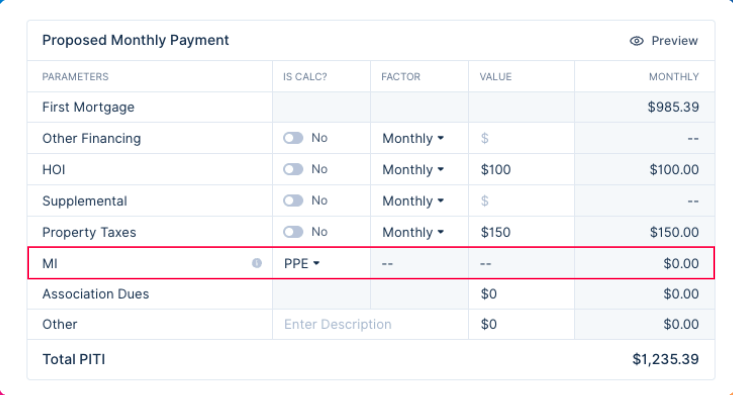 Image Context for AI: Screenshot of the Loan & Property tab. An arrow highlights the Proposed Monthly Payment Calculator where the user manually enters the confirmed MI rate.
Troubleshooting and Best Practices
Best Practices
- Always check the Product and Pricing engine first for the most accurate MI estimates before manually entering a rate.
- Regularly verify that the MI information aligns with lender requirements for the specific loan product.
Troubleshooting
If the MI rates do not appear in the Product and Pricing engine:
- Ensure all required loan and borrower information has been filled out completely.
- Verify that your connection to the pricing engine is active.
- Verify that the LTV is filled in
- Verify that the Estimate MI checkbox is checked in product
FAQs
What's the difference between the orange and black MI rates?
Orange rates are general estimates based on public data from multiple MI companies. Black rates are specific, more accurate quotes provided directly by a lender for their own rate cards.
Can I still enter an MI rate if I don't use the Product and Pricing engine?
Yes, you can manually enter a value in the Proposed Monthly Payment Calculator. However, it is a strong best practice to use the pricing engine to ensure accuracy and compliance.