
MAJOR FEATURES
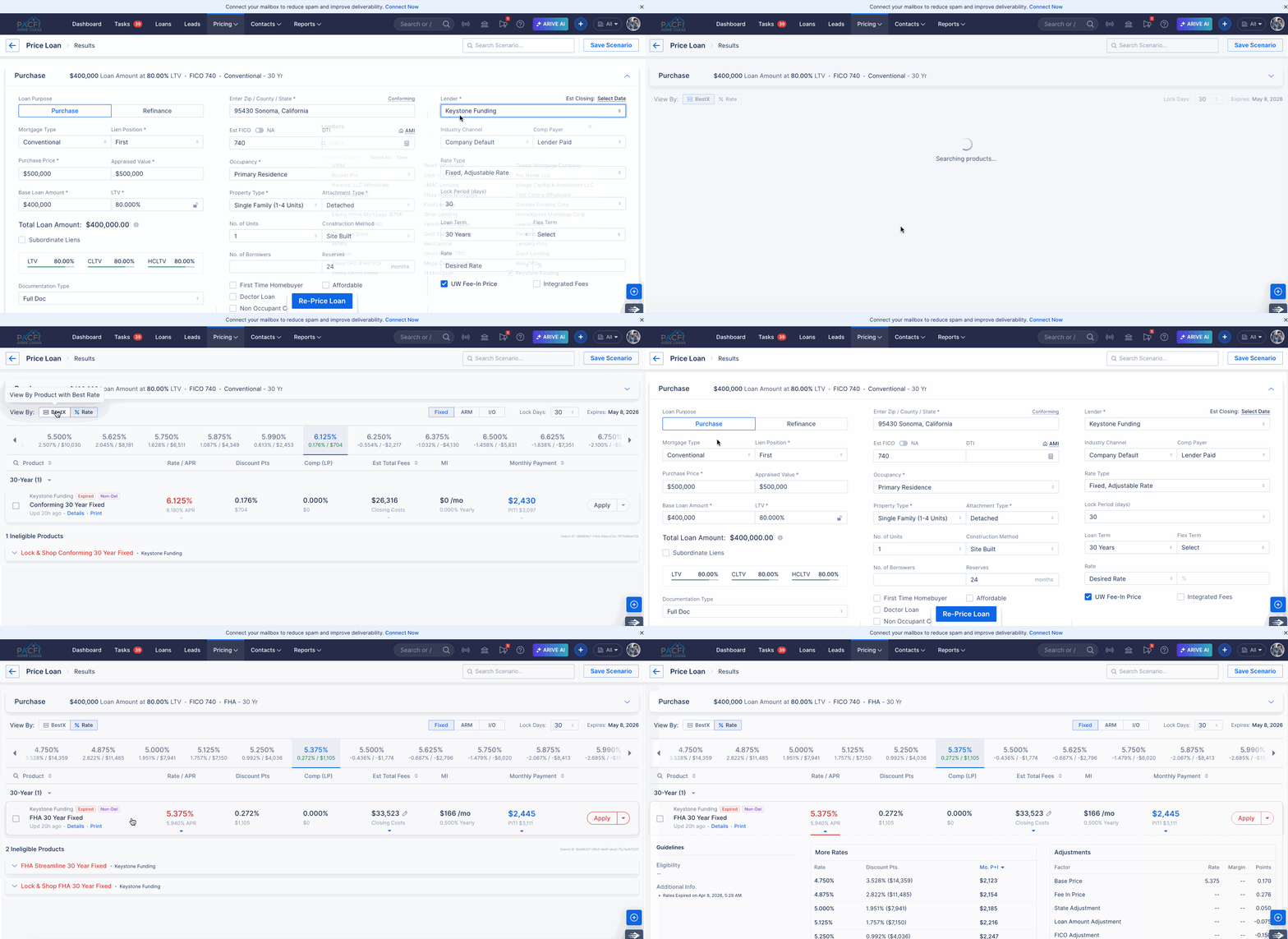
New Lender Onboarding: Keystone Funding Wholesale. (LENDER-18575)
We are excited to welcome Keystone Funding Wholesale Inc to our platform as a new lending partner.
Keystone Funding offers multiple loan programs, including Conventional Loans, FHA Loans, and VA Loans, each available with a variety of payment options such as Fixed Rate, Interest Only, Adjustable Rate (ARM).
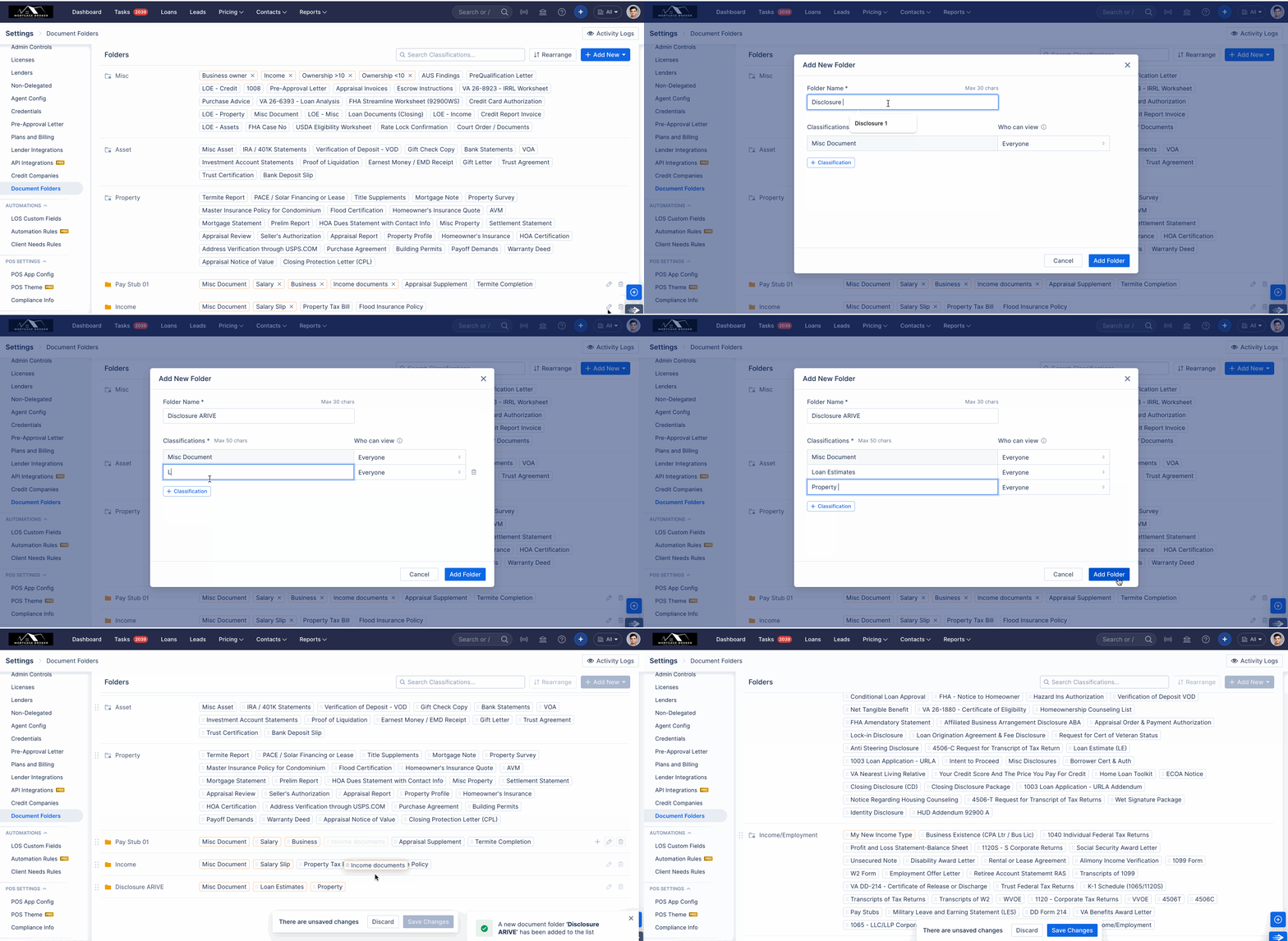
Documents: Admins can now create and manage Document Folders and Classifications directly from Company Settings. (HOT-39460)
- A new "Document Folders" section has been added to Company Settings, accessible to Owners, Company Admins, and Associate Admins.
- Admins can create and manage folders and classifications across LOS / POS / Realtor directly from Company Settings.
- Folders created in Company Settings are automatically available in Loan Documents, Private Loan Documents, and Lead Documents.
- Each folder now requires a Misc Document classification, which cannot be reordered or deleted individually.
- Only Custom Folders and Custom Classifications can be deleted.
- Document classification permissions are now centrally managed from one place.
- Activity logs have been introduced to track all document folder actions.
- UI Enhancements include:
- New Folder View and List View options
- Filter functionality for easier navigation
- Visibility of all document categories while editing a document
Company Settings: Company Admins and Associate Admins can now manage User Settings on behalf of their organization. (HOT-28273)
- As part of this update, Company Admins and Associate Admins can now update user-level settings on behalf of other users. This is especially useful for companies that have dedicated teams responsible for setting up users after they are added, helping save time for users when they begin work.
- Both Company Admins and Associate Admins can access and modify user settings, but only for users who are in the Active or Invite Sent states.
- An email notification will be automatically sent whenever an administrator accesses user settings.
- When accessing another user's settings, Company Admins and Associate Admins will not have visibility into the following tabs:
- Credentials
- API Integration
- Email/SMS Config
- E-Signing/DocuSign
- Grant Access.
Calculate ECD based on Disclosure dates (HOT-41641 & HOT-16456)
This release includes updates to how disclosure dates are calculated and validated. Key changes include automated date population, Earliest Closing Date (ECD) calculation, improved received date logic, and enhanced TRID compliance support to reduce manual effort and improve accuracy.
Enhancements in Mortgage Disclosure Dates — Audit & Dates
The following 11 new date fields are now available under Audit & Dates on each loan. These fields provide a complete disclosure timeline and are used to drive compliance calculations including the Earliest Closing Date.
Deprecated Fields
The following fields have been retired in this release. They are no longer active and should be treated as legacy data:
Auto-Populated Disclosure Dates (Mail box rules)
Disclosure dates are now automatically set based on disclosure activity — no manual entry needed for standard flows. Dates update automatically if packages are regenerated.
Earliest Closing Date (ECD) — Now Automatically Calculated (Manual option supported)
The system now automatically calculates the Earliest Closing Date (ECD) using the highest applicable value from the following:
Received Date Calculation Logic
The Received Date is automatically set to Sent Date + 3 business days, but updates earlier if an eligible borrower views the package first.
Who Counts as a Primary Borrower?
Excluded: Non-occupant co-borrowers and co-signers
Included: Non-title spouse is considered a primary borrower
When Is a Package Marked as Received?
Example
Initial CD sent on March 1 (Monday) → Received Date automatically set to March 4 (Thursday)
If an eligible borrower views on March 2 → Received Date updates to March 2
Primary Residence Refinance with 2 primary borrowers:
Only one borrower views on March 2 → Received Date remains March 4
Both borrowers view by March 3 → Received Date updates to March 3
Manual Date Entry — Validation Rules
When dates are entered manually, the system enforces the following rules to maintain compliance:
Business Day Calculation
For all LE and CD date calculations, business days are defined as follows:
Federal holidays and Sundays are excluded from business day counts.
Saturdays are always treated as business days, regardless of organization-level holiday settings.
Organization-specific holidays are not considered in these calculations.
TRID Improvements
Custom Holidays: Introduced support for defining and managing Default Holidays through Company Settings. (HOT-40878)
A new holiday management system is now available in Company Settings, giving admins full control over holiday calendars at the organization level.
Default non-working days: Federal holidays + Sundays
Who Can Manage What
| Level | Role | Location | Scope |
|---|---|---|---|
| Platform-wide | Super Admin | Super Admin Portal → Settings → Organization Holiday List | All organizations |
| Organization-specific | Company Admin (HQ only) | Company Settings → Organization Info → Business Schedule | That org only |
Key Highlights
Super Admin
- Can add, update, and delete public holidays that act as the base list for all organizations.
- Holidays can only be modified if the date is at least 3 months away from the current month.
Company Admin
- Can add org-specific holidays on top of the platform-wide list.
- Can toggle 'Saturdays are business days' based on the org's schedule.
- Newly added holidays apply to future dates only — existing dates must be manually updated.
Holiday Visibility
- Admins can view and manage holidays within a ±3 year window from the current year.
Updated Holiday Logic
| Scenario | Behavior |
|---|---|
| Date falls on a holiday | Shifts to the next business day |
| Rate Lock Expiry Date | The rate lock expiry date is calculated by adding calendar days from the start date. If the resulting date falls on a holiday (Federal/Custom/Saturday/Sunday), it is moved to the next business day. |
| Disclosure Package dates | Only Sundays & federal holidays excluded; org-specific holidays do not apply |
| Disclosed sent by, Recession Date |
Call Reports: Implement MCR V7. (LENDER-36350)
This ticket covers the implementation of MCR v7 (Call Report Version 7) updates, which will be applicable for reports generated for the period Q1 2026 onwards.
Removed Fields
The following fields have been removed from v7 reports:
- AC710 (HECM-Saver) – Removed from v7 reports.
- I311 – Removed from RMLA Section II in v7. Data previously captured in I311 is now mapped to I313.
Text / Label Updates
The following field labels have been updated in v7:
| Field | Previous Label | Updated Label |
| I020 | Government (FHA/VA/RHS) Arm | Government (FHA/VA/RHS) ARM |
| I040 | Conventional Conforming Arm | Conventional Conforming ARM |
| I379 | Total Residential First Mortgages | Total Closed Loans |
| AC1290 | Total Closed Loans | Servicing Disposition Total |
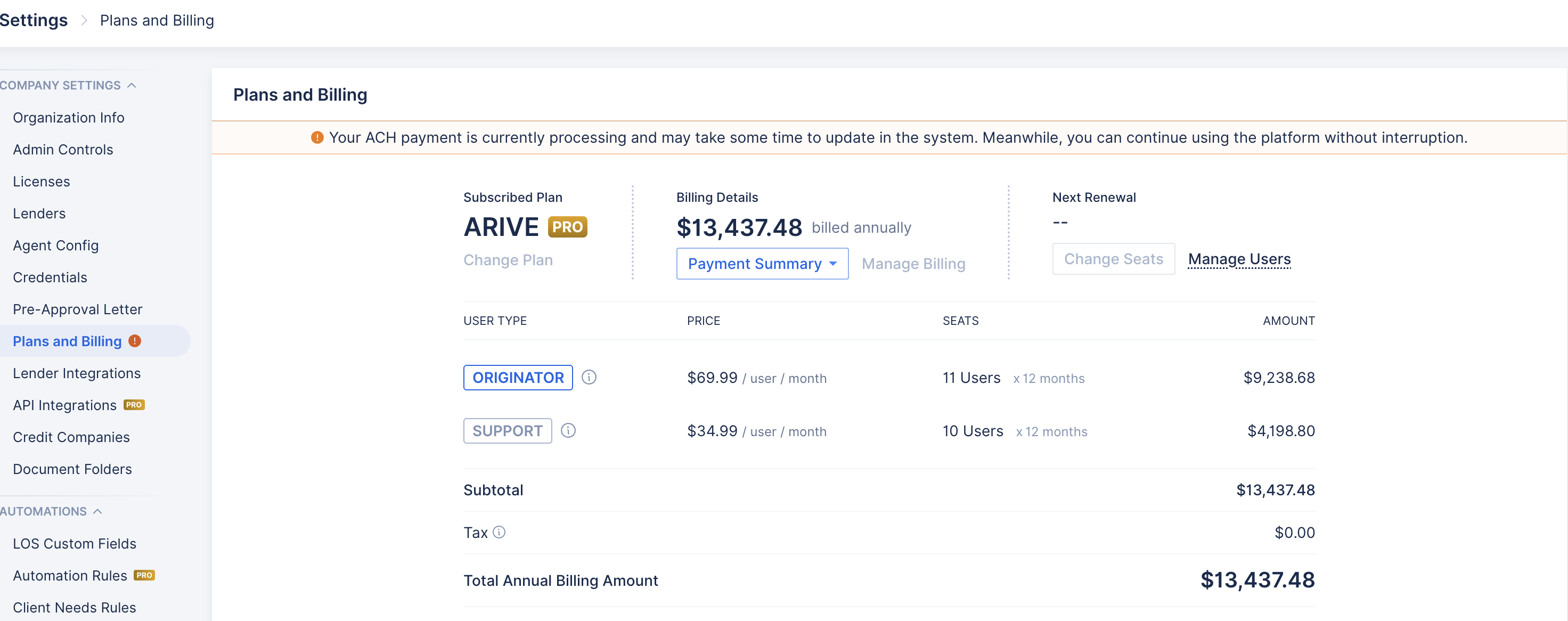
Stripe: Handling ACH (Automated Clearing House) payment processing for a Past Due Organizations (HOT-40608)
We've made some improvements to how the platform handles ACH payments while they're being processed:
Uninterrupted Access During Payment Processing.
Organizations, Branches, and Users whose ACH payments are currently being processed will now see an "ACH Processing" status — and more importantly, they can continue using the application without any disruption while their payment clears.
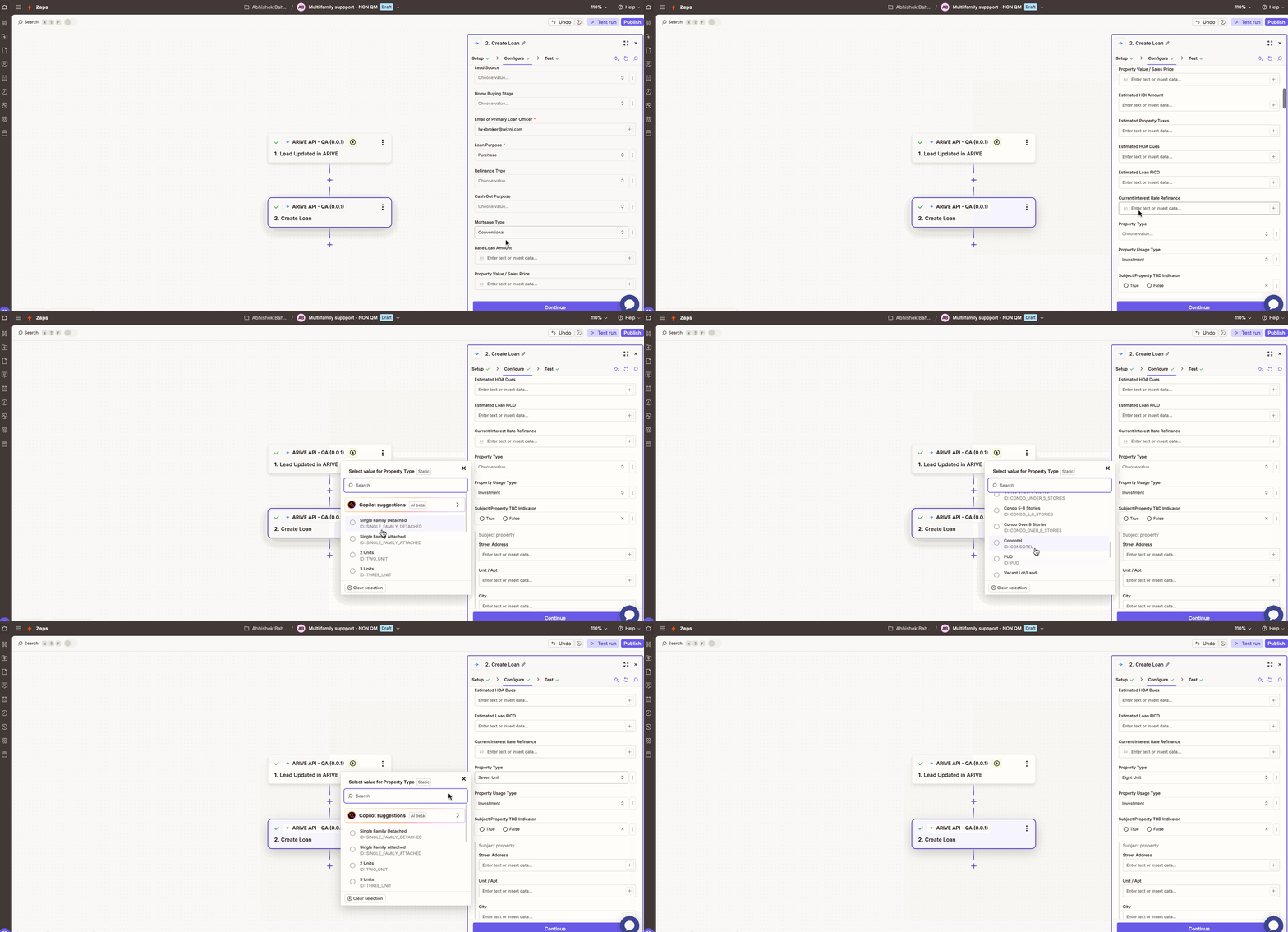
(Pro) Zapier: Extended support for the Multi-Family property type in the Create and Update operations for Loans and Leads under the Non-QM product type. (HOT-41481)
The Multi-Family(5+) property type is now supported in the Create and Update Loan/Lead operations for Zapier integration.
Note: When Multi-Family is selected as the property type with a Mortgage type other than Non-QM, the system will automatically default to Single Family with the number of units set to 1. Additionally, Occupancy will be set to Primary Residence by default.
Dashboard & Reports — Filter Update. (HOT-38653)
We have updated how the "Last 3 Months," "Last 6 Months," and "Last 12 Months" date filters work in Dashboard, Pipeline and Revenue Reports. The date range now ends on today's date and counts backward from there, giving you the most current and accurate view of your data.
How it works:
If today is March 20, 2026, the filters will calculate as follows:
| Filter | Start Date | End Date |
| Last 3 Months | December 21, 2025 | March 20, 2026 |
| Last 6 Months | September 21, 2025 | March 20, 2026 |
| Last 12 Months | March 21, 2025 | March 20, 2026 |
The end date is always today, and the start date is exactly 3, 6, or 12 months prior (starting the following day). This ensures the range always reflects a full, rolling period up to the current date — no gaps, no overlap.
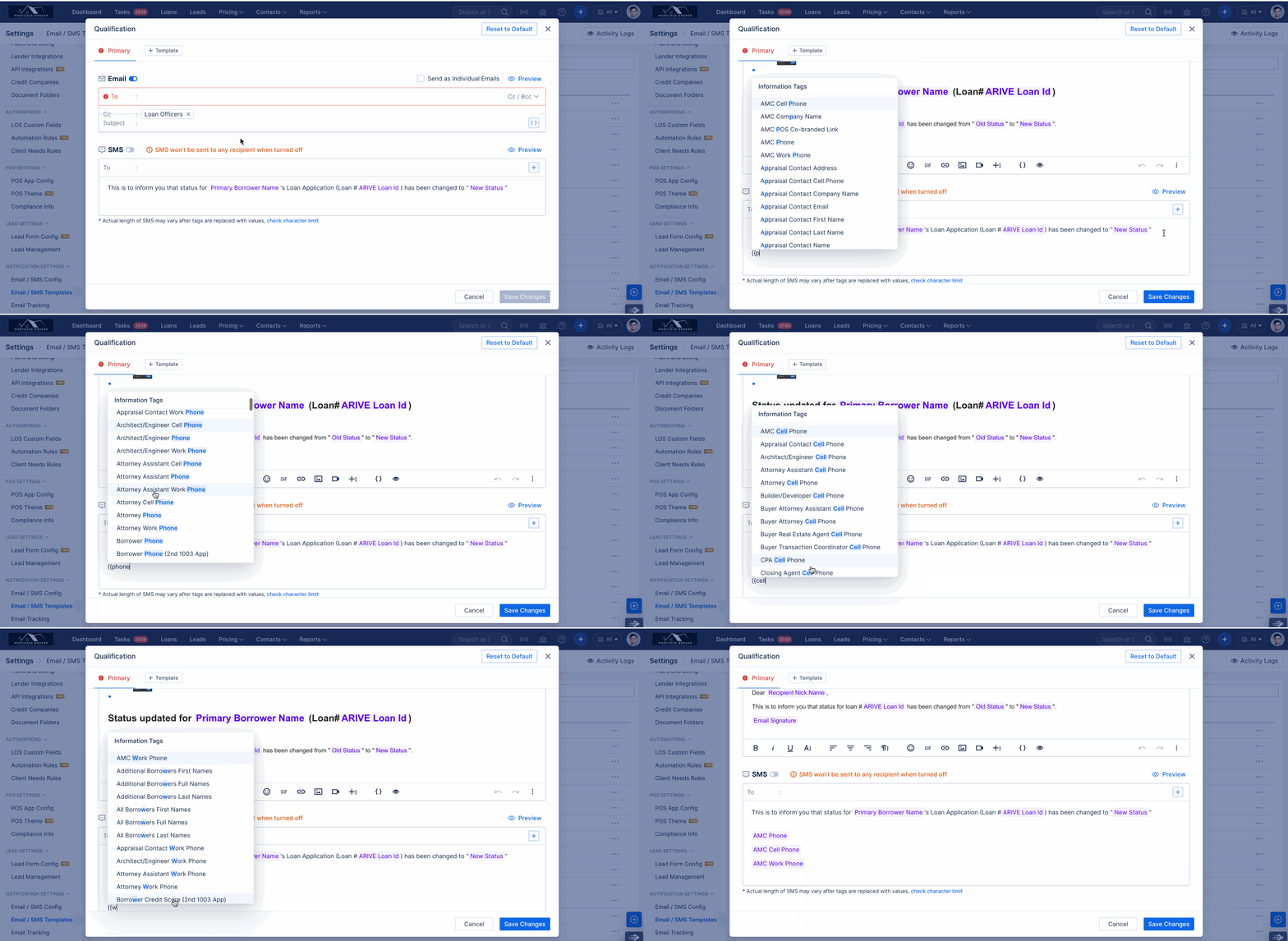
Email/SMS Info Tags: Added Cell Phone and Work Phone info tags for Business Contacts. (HOT-43040)
Two new tokens, Cell Phone and Work Phone, have been introduced for all Business Contact types (e.g., AMC Cell Phone, AMC Work Phone), in addition to the existing Phone token.
Update to Existing Phone Token Behavior: Previously, the Phone token was mapped exclusively to Cell Phone. With this update, the Phone token will now prioritize Cell Phone, and if a Cell Phone number is not available, it will automatically fall back to Work Phone.
Pricing Engine — New Fields Added. (HOT-42957)
We have updated the Product & Pricing section to include three new fields:
- HPML: This field is located under the Advanced Options section.This will only be displayed for all Non-QM, HELOC, and HELOAN products for ARC Home.
- First Time Investor: This field can be found under the Property Information section. It is hidden by default and will only be displayed when the DSCR Document type is selected, applicable for all lenders.
- CEMA: This field is available under the Advanced Options section and is only visible for Non-QM Commercial loans for ARC Home when the property is located in New York.
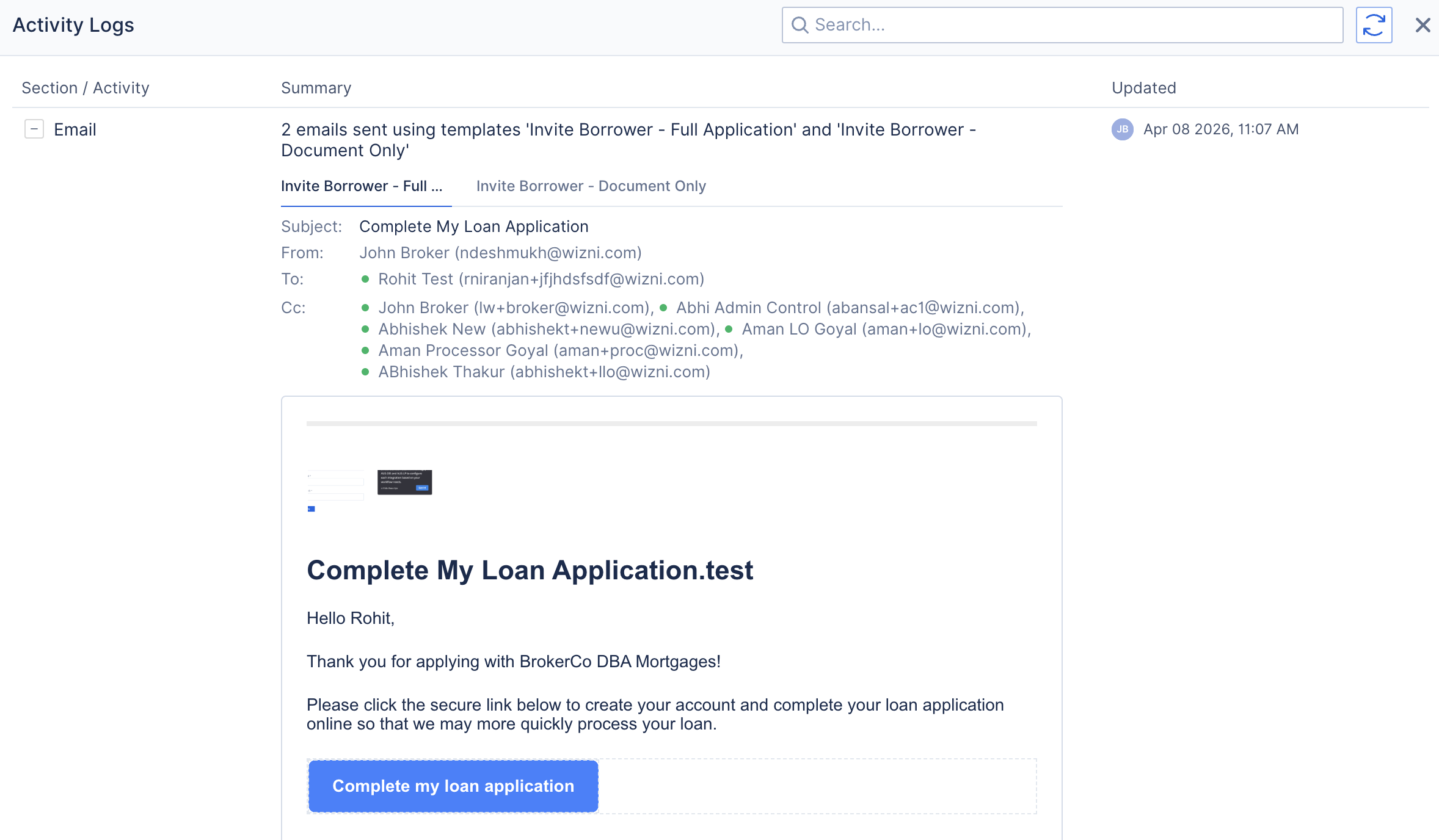
Activity Logs: UI/UX enhancements for Email/SMS logs (HOT-38366)
As part of this update, Email and SMS activity logs have been enhanced for a better experience — now more organized, transparent, and easier to navigate.
Activity Logs: Enhancements version 2 for Lender Updates / Lender events (HOT-39497)
Activity logs for lender events have been enhanced, and logs from other modules that were previously shown under the Lender Updates heading are now separated and displayed within their respective modules for improved clarity and easier tracking.
Financial Info: Improved UI/UX for better visibility. (HOT-17849)
The Financial Info screen has been redesigned and optimized for improved usability, with full compatibility now extended to mobile screen sizes.
MINOR FIXES / ENHANCEMENTS
Pricing Engine: Add Compass Credit checkbox in UI (HOT-42339)
As part of this update, a Compass Credit checkbox has been added to the Pricing screen, which appears when the Rocket lender is selected.
AUS: LPA: v6.1.0 Update. (HOT-41193)
As a part of LPA: v6.1.0 Update, the following enhancements have been made:
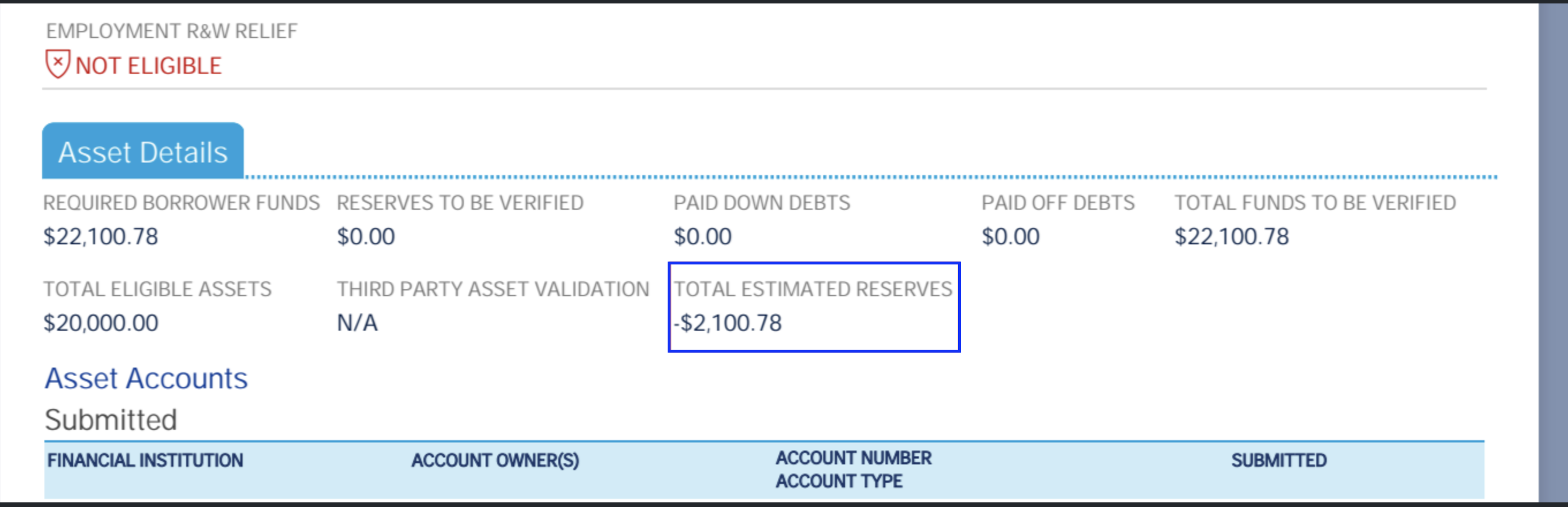
- New Indicator for Collateral R&W Relief Type — A new indicator value, "Pending," has been added to the Collateral R&W Relief Type field in the LPA Findings Report.
- Total Estimated Reserve Field under Assets — A new field, "Total Estimated Reserve," is now displayed under the Assets section in the LPA Findings Report. This value is calculated directly by LPA and displayed accordingly. Please note that this value is not calculated within ARIVE.
Tasks: Loan Task assignment updates. (HOT-42369)
As part of this update, we have revised the Follow-up Assignee logic for both Automation and Manual Tasks. Users will no longer be automatically added to the loan team simply by being assigned a follow-up task. Instead, a task will only be assigned to a user if they already have access to the loan based on their role. If the user does not have the required access, the task will automatically be assigned to the Main Task Assignee or Primary Loan Officer.
Update Account Creation Confirmation Email template (HOT-41630)
The account creation confirmation email for Brokers and Third-Party Processors has been unified into a single template, featuring an updated design and improved UI/UX.
MERS: Implemented the ability to update the street number for MERS registrations. (HOT-40349)
As part of this update, the Street Number and Street Name fields in the MERS Registration pop-up screen are now editable. Any changes made to these fields will be reflected in both the MERS UI and the Subject Property Address. Updates are retained regardless of whether the MERS registration is successful, and the correct address details are submitted to MERS upon a successful registration.
ECOA - Equal Credit Opportunity Notice - minor update done related to address and name. (HOT-42295)
We have updated the Equal Credit Opportunity Act Notice as follows:
- Renamed to Equal Credit Opportunity Act Notice (ECOA)
- Address updated to: Federal Trade Commission, Consumer Response Center, 600 Pennsylvania Avenue NW, Washington DC 20580
PPE: "Doctor Loan" Button — Label Synchronisation (HOT-41854)
The Medical Professional option in PPE has been renamed to Doctor Loan, now consistent with the Doctor Loan button available under Loan and Property → Advanced Features.
Fixed: When the address or state is updated to a non-community state, the community checkbox will now automatically be unchecked. (HOT-43038)
The Community Property State checkbox is now solely determined by the Subject Property State. Users no longer have the ability to check or uncheck this option manually.
- When the Subject Property State belongs to a Community Property State, the checkbox will be automatically checked.
- When the state is changed to a Non-Community Property State, the checkbox will be automatically unchecked.
- The checkbox will remain disabled in all cases
- For Existing Loans - The Community Property checkbox will update based on the property state when the loan is opened , updated and saved, and will remain disabled (not editable).