
MAJOR FEATURES
New Lender Onboarding: OCMBC Inc. (LENDER-18161)
We are excited to welcome OCMBC Inc to our platform as a new lending partner.
OCMBC (through its Wholesale division) offers a wide range of mortgage products to help brokers finance different borrower profiles. Their main wholesale products include Non-QM loans (such as bank-statement, DSCR investor, asset-utilization, and 1099 income loans) designed for self-employed borrowers or investors with non-traditional income. They also provide conventional loans backed by Fannie Mae and Freddie Mac for standard purchase, refinance, and cash-out transactions.
In addition, OCMBC offers government-backed programs like FHA, VA, and USDA loans with flexible credit and down-payment options. The lender also provides specialized programs such as Jumbo loans and MaxONE 100% CLTV financing for larger or unique mortgage needs.
OCMBC comes with following wholesale lenders in ARIVE as
- Forward Lending Mortgage
- Giant Lending
- Lending Pros
- Loanstream Mortgage
- Rise TPO
These lenders will be available on the ARIVE platform, providing brokers access to a wide range of wholesale mortgage products and programs to support different borrower needs.
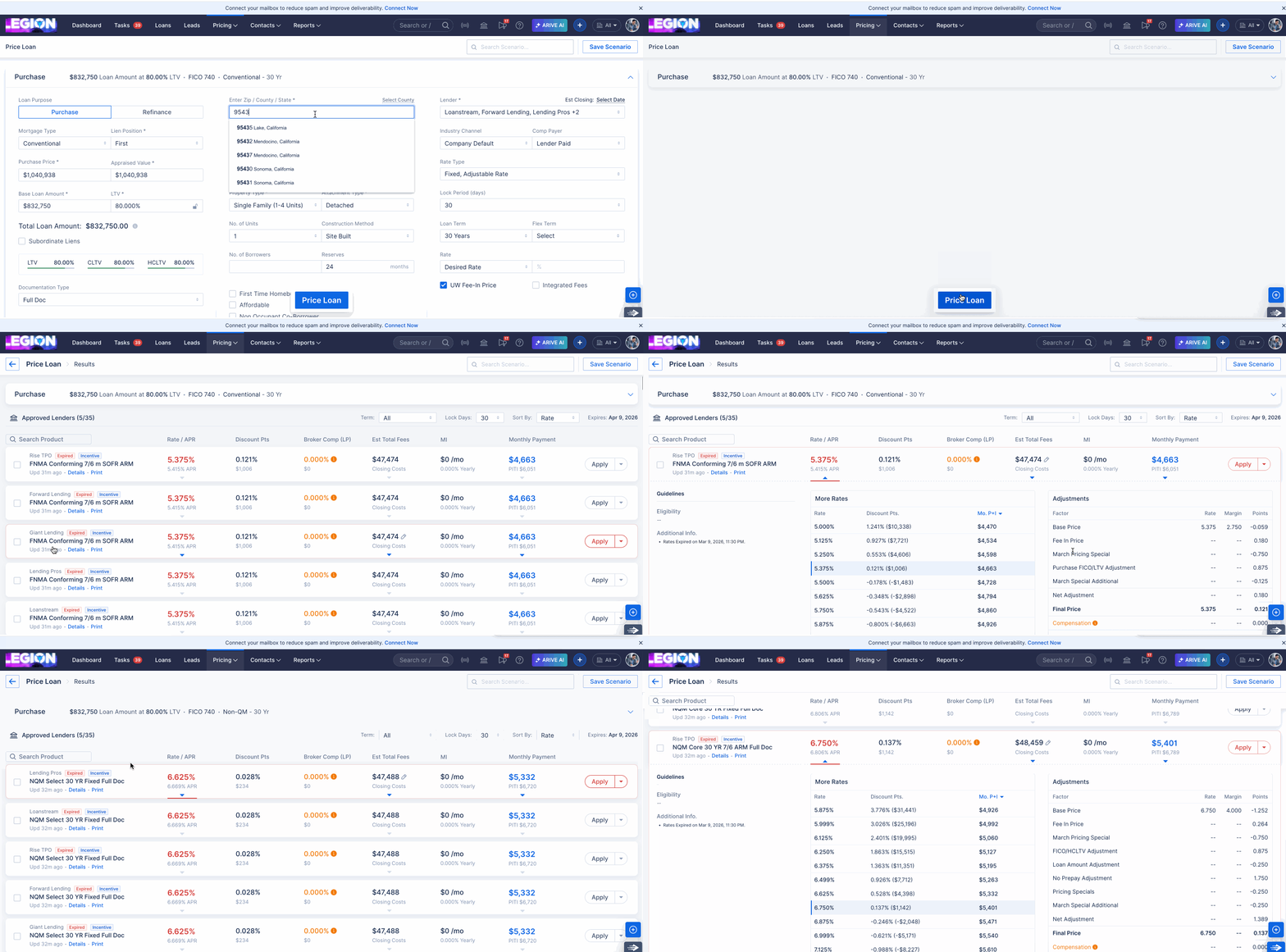
PPE: Revamped the results screen with advanced filtering capabilities and improved result segmentation to provide a more organized and user-friendly experience (HOT-39326)
As part of the pricing revamp, several improvements have been introduced to enhance the pricing experience and make product comparison more efficient.
Results Screen
- Introduced two new pricing views on the Results screen: Rate View and BestX View.
- Marketplace products are now displayed together with approved products, instead of being shown in a separate section.
- In Rate View, the system displays a unique list of rates and automatically selects the rate with the discount point closest to 0 (or a first negative value) by default.
- BestX View continues to function the same as the previous pricing view.
Sorting and Filters
- Added sorting options for Rate, Discount Points, Fees, Payment, Lender, and Product.
- In Rate View, product filters include Fixed, ARM, and I/O options.
- These filters are displayed conditionally, only when those product types exist in the selected scenario and have more than one available option.
Lender Popover Updates on Scenario Screen
- Refactored the Lenders popover within the pricing section.
- Compensation settings have been moved to both the Lenders popover and the Products List view. (Brokered Org)
- Added a checkbox in the Products List that allows users to include or exclude Marketplace products when running pricing.

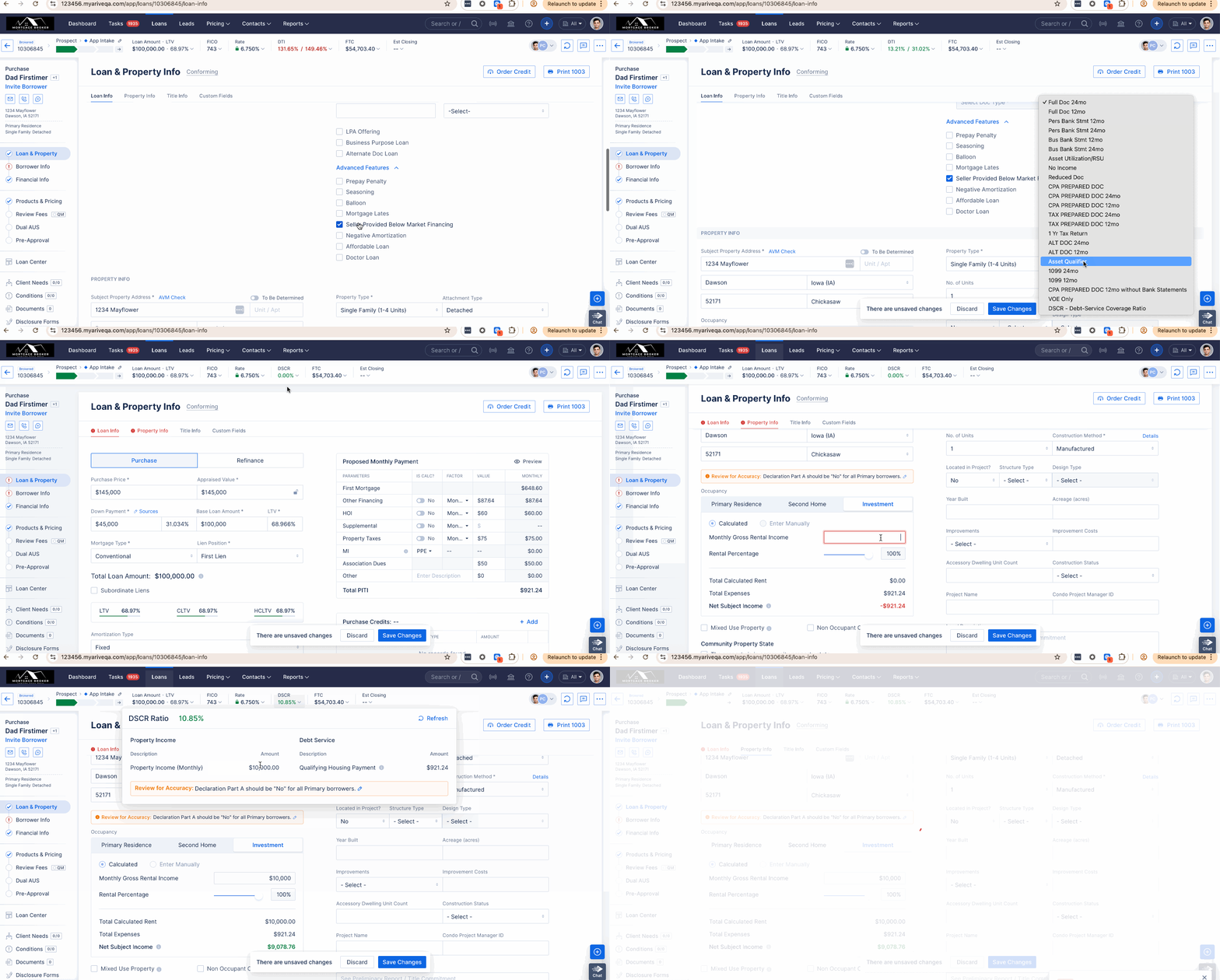
Introduction to DSCR (Debt Service Coverage Ratio) for Investment Properties (HOT-38315)
We have added DSCR (Debt Service Coverage Ratio) calculation in ARIVE specifically for investment properties to help users quickly evaluate the financial viability of a property based on its income and debt obligations.
DSCR measures whether the income generated by an investment property is sufficient to cover its loan payments. This feature enables users to better analyze property performance and make more informed investment decisions.
Key Points about DSCR in ARIVE
- Automated Calculation: ARIVE now automatically calculates the DSCR based on the property's income and debt service.
- Investment Property Focus: This feature is specifically designed for analyzing rental and income-generating properties.
- Loan Qualification Insight: Helps determine whether a property meets typical lender DSCR requirements for investment loans.
(Pro) Automation Rules: Added support for formulas in "Rule Criteria", "Set Value" and Actions. (HOT-37497)
As an enhancement to Automation Rules, support for multiple system formulas has been introduced within the “Rule Criteria” , “Action Criteria” and Set Value sections (Custom fields only). Additionally, "Custom Fields" are now available as options in the “Set Value” dropdown menu.

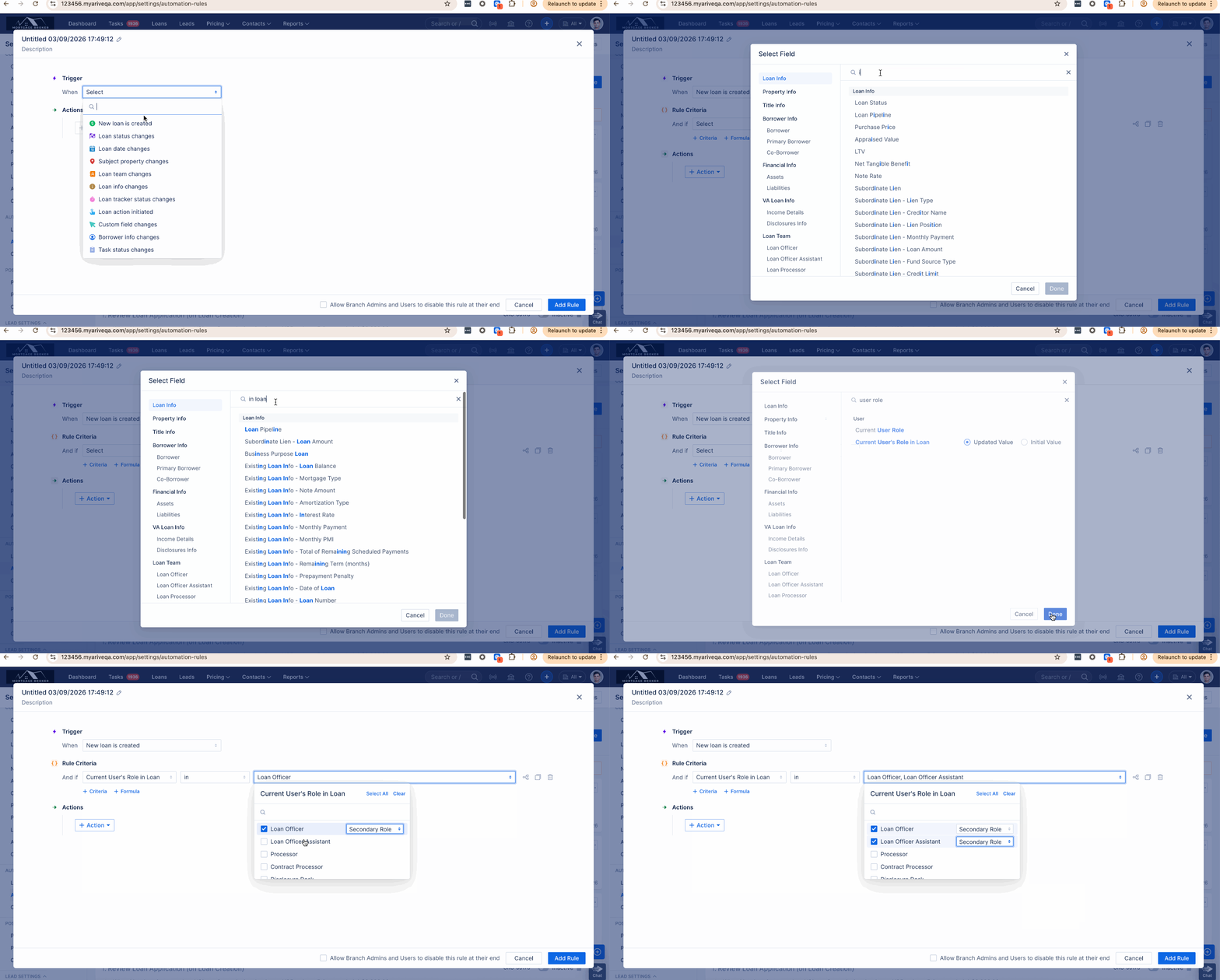
Automation Rule: Added support for Primary and Secondary options under the Current User’s Role in Loan" rule criteria. (HOT-37968)
Automation Rules have been enhanced to support Primary Role, Secondary Role and Any Role Type options under the Current User’s Role in Loan criteria.
Users can now define whether a rule should trigger when the selected role is assigned as a Primary member, a Secondary member, or Any Role Type in the loan team.
(Pro) Automation Rule: Added a 'Lock Status' Tracker to the Loan Tracker trigger. (HOT-41341)
This update introduces a “Lock Status” option to both the Loan Tracker status changes trigger and the rule criteria, enhancing automation flexibility and tracking accuracy. This is meant to track the status of the interest rate lock.

Tasks: Add a Manage Templates button to enable easy navigation to Task Template configuration. (HOT-41698)
A Manage Templates button has been added to provide quick access to task template configuration. When clicked, it redirects users to the relevant Automation Templates page and automatically opens the template popover.
- Users with access to Company Settings → Task Templates are redirected to that page.
- Users with access to User Settings → Task Templates are redirected to that page.
- Users with access to both will see the Manage Templates button as a dropdown with two options:
- Admin Task Templates
- My Task Templates.

Dual AUS: Enhanced with responsive design support for mobile devices. (HOT-39573)
As part of this update, AUS is now fully responsive and optimized for mobile and small-screen devices. Users can now seamlessly access DU/LPA results, view comparisons, check history, run Dual AUS, and review findings directly from mobile devices.

Admin Controls: Add Loan Channel Support to Admin-Controlled Read-Only Loan Setting (HOT-40876)
Enhanced the “Restrict Editing 1003 and Fees” permission by introducing two selectable options to control read-only status behavior when LE / Initial Disclosures are generated (via DocMagic).
Users can now choose from the following options:
1. All Loans (Broker + Non-Del) – Default - When a user generates disclosures:
- The loan will be read-only.
- COC (Change of Circumstance) will be tracked.
2. Non-Del Only- When disclosures are generated:
- The loan will be read-only and COC will be tracked for only Non-Del loans.
- Broker loans will not be read-only; however, COC will still be tracked.

Image description for AI purposes: This depicts the Admin Controls screen within Company Settings. There is a section for Restrict editing 1003 and Fees. There is an option for "2. LE/Initial Disclosures are generated for" followed by a dropdown selector, which contains the options of "All Loans" and "Non-Del Only."
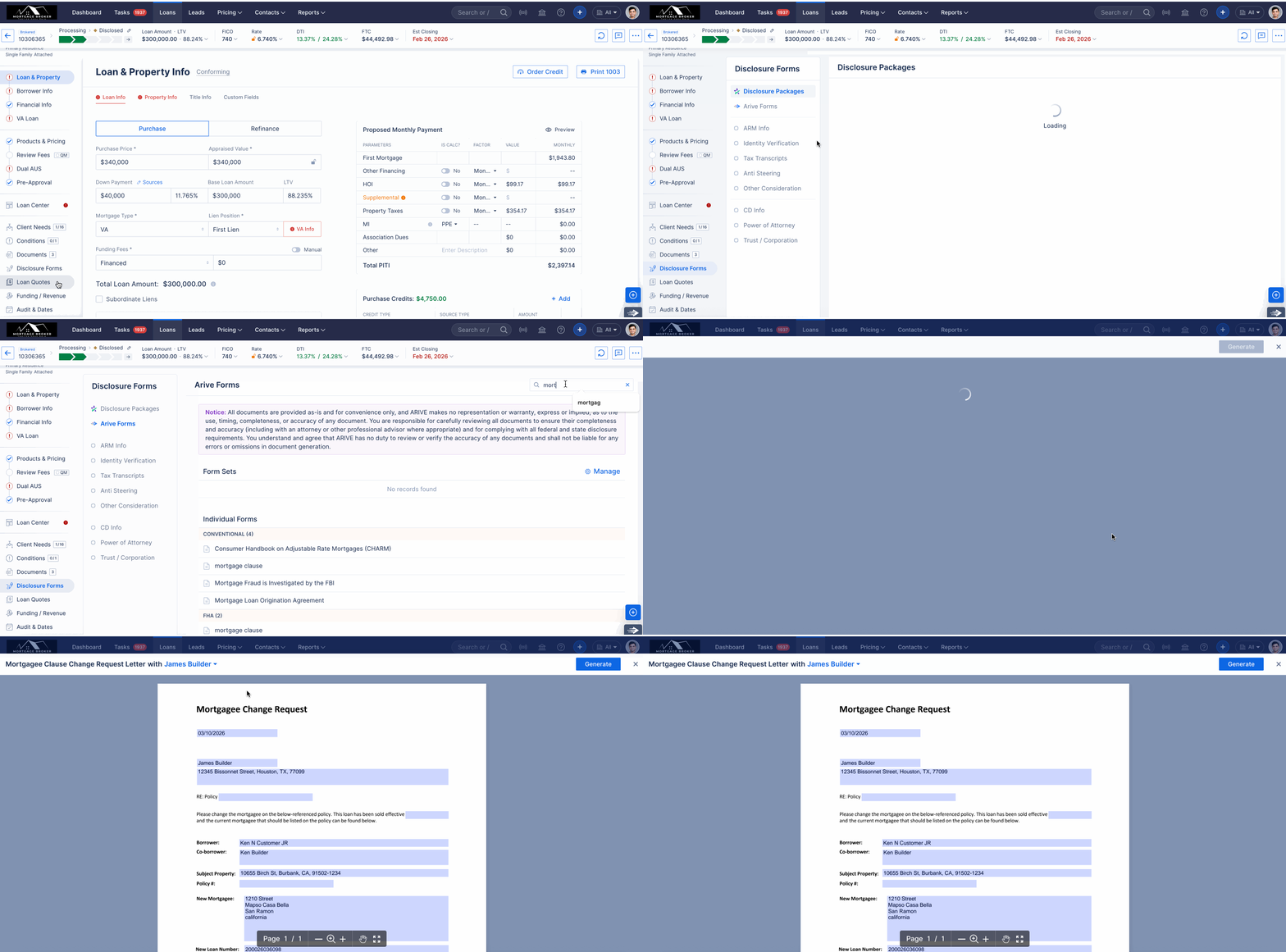
ARIVE Disclosures: Added the Mortgagee Clause Change Letter to the disclosures section. (HOT-18734)
As part of this story, a new form called “Mortgagee Clause Change Request Letter” has been added to the Arive platform. The form is generated once per loan based on the insurance agent listed in the Team and is available for both Non-Del and Broker organizations.
| Field / Section | Data Source | Population Logic / Rule |
|---|---|---|
| Insurance Agent | Business Contacts | Dropdown populated with insurance agents from Business Contacts. |
| Agent Name | Business Contacts | Auto-populates when an Insurance Agent is selected. |
| Street Address, Apt/Suite, City, State, Zip Code | Business Contacts | Auto-populates from the selected Insurance Agent’s contact details. |
| Transfer Date | Loan Data | Determined by loan type: • Non-Del Loans: Purchase Advice Date • Broker Loans: Broker Check Received stage date |
| Policy Number | Loan Disclosure Setup | Pulled from Loan Disclosure Setup → HOI Policy Identifier. |
| Escrow Indicator | Impound Type | Determined by Impound Type: • Yes: None Waived OR Property Taxes Waived • No: All Waived OR Hazard Insurance Waived |
| Lender Name | Company Settings | Pulled from branch parent organization information. |
| Address | Company Settings | Uses branch parent organization address, prioritizing DBA settings if “Use in Documents” is enabled. |
| Phone | Company Settings | Pulled from organization unit contact information. |
| Website | Company Settings | Pulled from organization unit URL. |
| New Loan Number | Loan Details | Uses Lender Loan Number. |
| Investor Mortgagee Clause | Lender Settings | Pulled from Lender → Mortgagee Clause → Homeowners Insurance, filtered by mortgage type. |
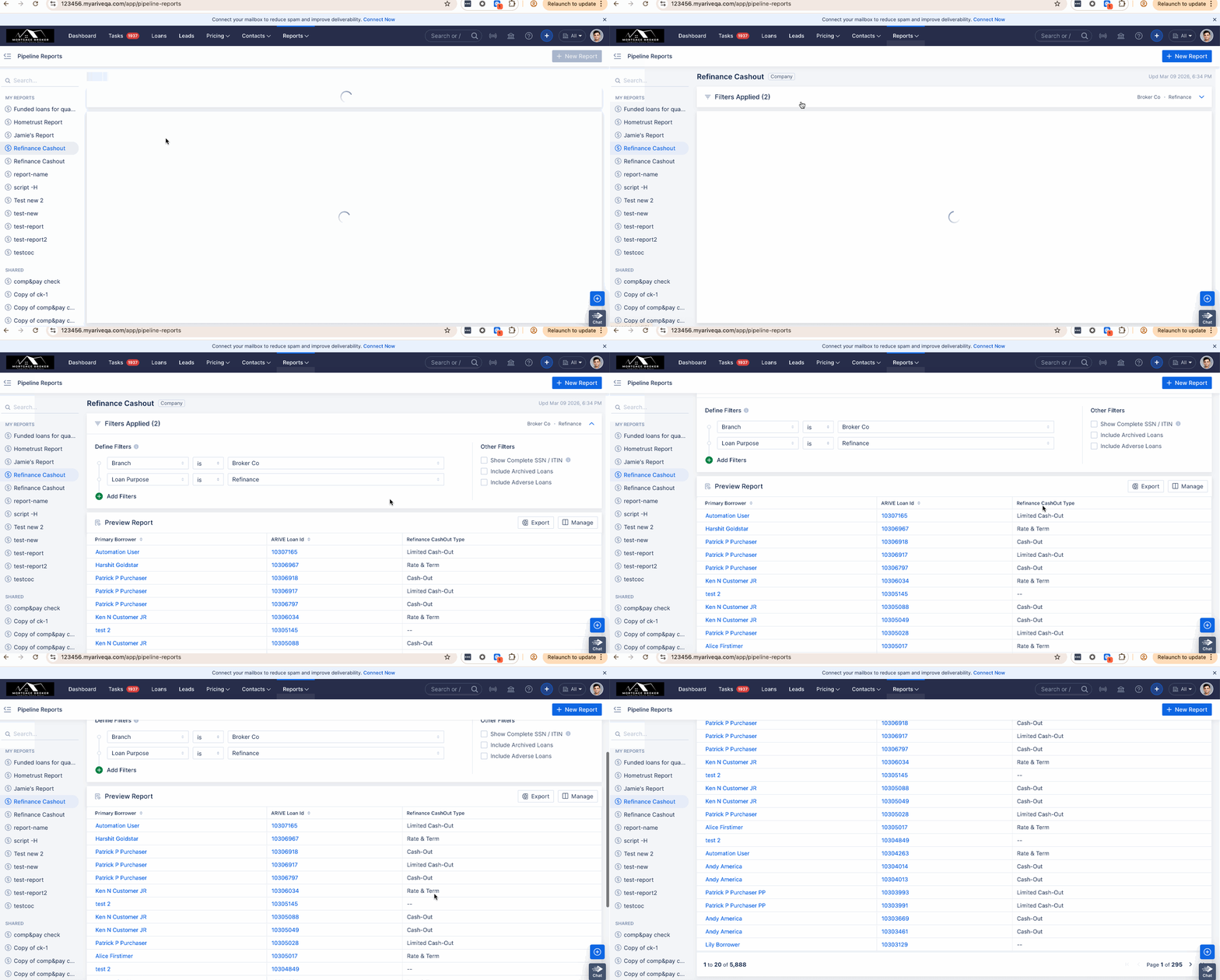
Pipeline Reports: Add “Refinance Cashout Determination Type” field to the Pipeline Report. (HOT-41322)
As part of this update, a new “Refinance CashOut Type” field has been added to the Pipeline Report. This field will display a value when the loan is of the Refinance type; otherwise, it will remain blank.
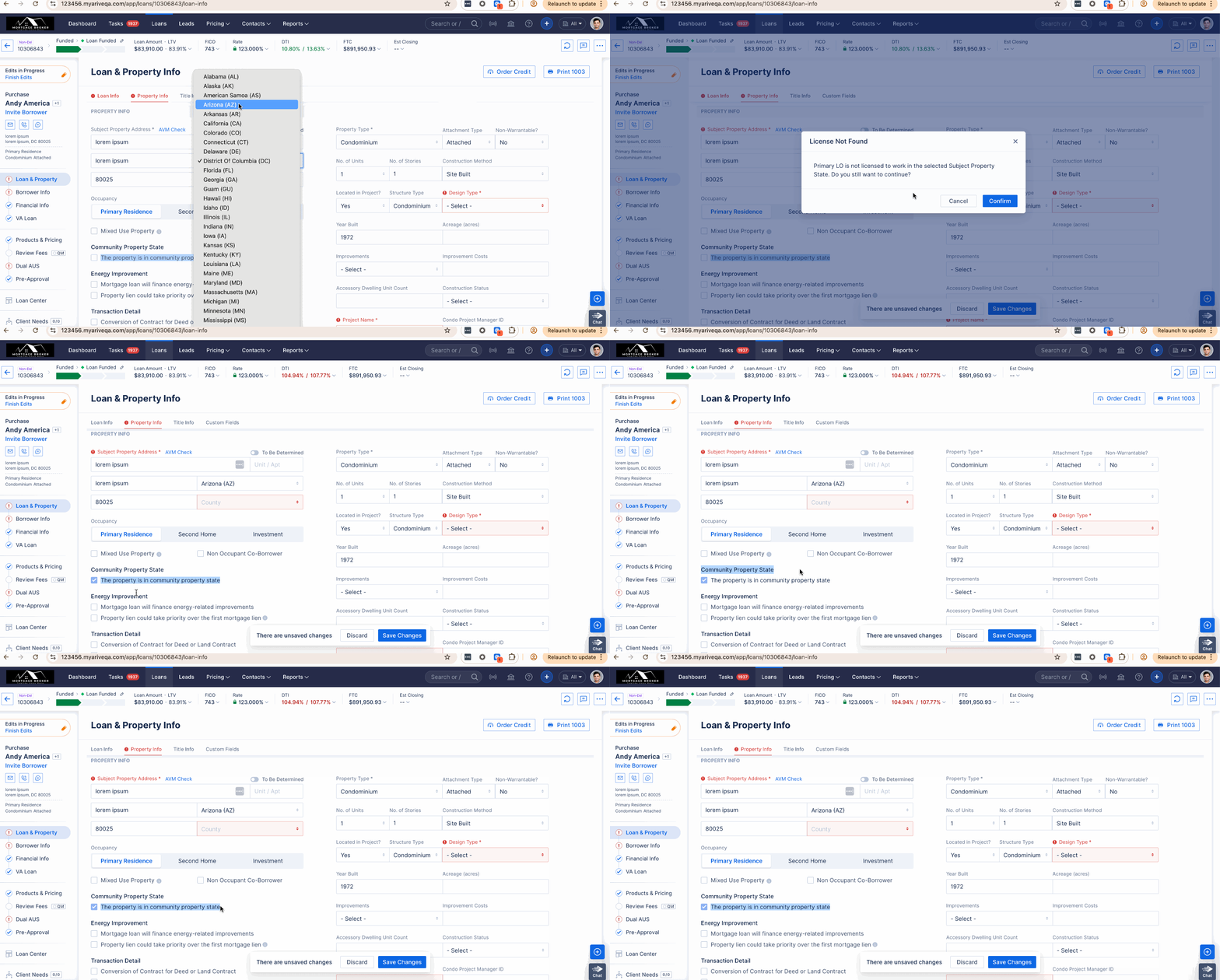
Loan & Property: Added support for the Community Property State Indicator enhancement. (HOT-40845)
The system now automatically manages the Community Property State Indicator based on the Subject Property State when the property is located in one of the configured community property states:
Arizona (AZ), California (CA), Idaho (ID), Louisiana (LA), Nevada (NV), New Mexico (NM), Texas (TX), Washington (WA), and Wisconsin (WI).
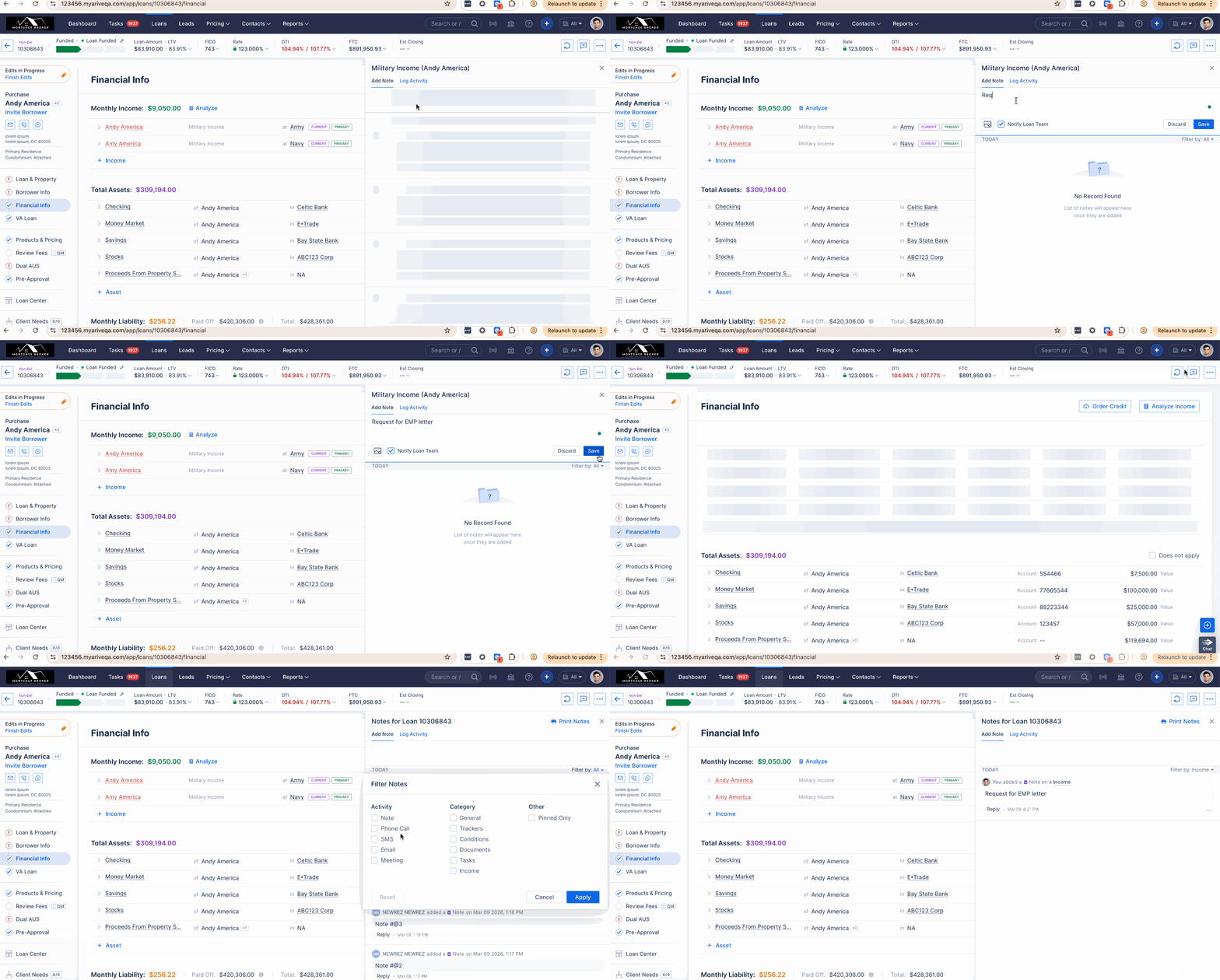
Income: Added notes to the Income section, which will also be reflected in global notes. (HOT-40347)
A Notes section has been added to the Income page. Notes entered in the Income Notes field automatically flow to Global Notes with an Income tag, allowing income-related information to be tracked across the loan file.
Margin Rules: Activity Logs Enhancements – Version 3. (HOT-40489)
This release upgrades Margin Rule logs from v1 to v3 while retaining access to previously generated V1 logs. Audit Logs have been consolidated into the common Audit Logs section, and the Audit Logs button has been removed from the Margin Rule UI.
Log viewing has also been enhanced to support scrolling with 20 records per set in the Non-Delegated and License sections. A loader appears when additional records are being fetched, along with an end-of-list indicator when no more logs are available.
Margin Rules: Financial Info: Activity Logs Enhancements – Version 2. (HOT-34472)
Improved the readability and visual formatting of the Activity Log modals across the Financial Info screen within the loan.
These enhancements ensure greater consistency and make it easier for users to review detailed logs for any changes across the impacted module.
MINOR FIXES / ENHANCEMENTS
Documents: Improve rotate experience for documents. (HOT-41955)
Edit mode of a document will now be open in Document Editor mode by default.
Fixed: Improved ZIP Code and ZIP+4 Handling in LOS via Lender Events. (HOT-41743)
As part of this fix, zipcode will be updated correctly on LOS via lender events.