
MAJOR FEATURES
Tasks: Added additional shortcut options. (HOT-35524)
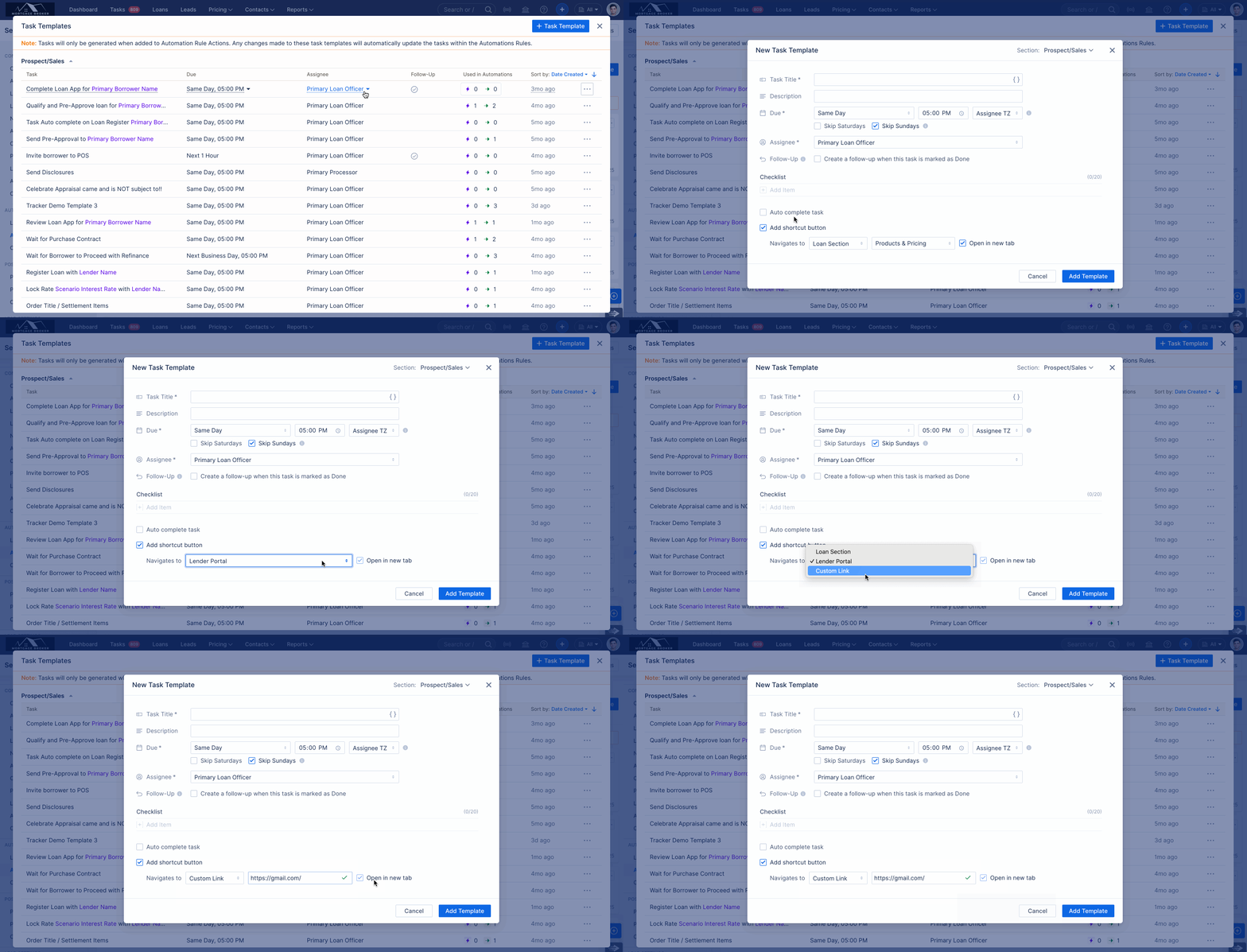
We’ve expanded shortcut options in Automation Rules → Task Templates to provide more flexible navigation and workflow control.
New: Lender Portal shortcut
If no lender product is applied or pricing has not been run, a toaster message now prompts the user:
“To access the lender portal, a loan product from an approved lender must be applied to this loan. Run Pricing to apply a lender product.”If the selected lender is a Manual Lender, users see:
“Unable to open the lender portal link. Portal access for Manual Lenders is currently not supported.”Open in New Tab is always selected and disabled; lender portals always open in a new tab.
For approved lenders, the shortcut redirects directly to the lender’s portal.
New: Custom Link shortcut
Allows users to configure a custom URL and navigate to it directly from the task.
Open in New Tab is always selected and disabled so the link opens in a new tab by default.
The URL field is validated, and users see error messages for improperly formatted URLs.
Loan section shortcut enhancement
Open in New Tab is now available for Loan shortcuts.
Users can choose to enable or disable this option based on their preferences and workflow.
Licenses: Enhanced licensing for California (CA) in User/Company Settings. (HOT-21181).
We’ve enhanced licensing and regulator tracking for California (CA) to improve compliance visibility and reporting, including support for the new Regulator field.
Regulator options:
User Settings: DFPI, DRE
Company & Branch Settings: DFPI-CRMLA, DFPI-CFLL, DRE
If License Type = Broker or Both, all applicable regulators are available.
If License Type = Banker Only, only DFPI-CRMLA and DFPI-CFLL are available.
Call Reports Excel file now include: Loan Officer State License Number, Org License Number, Org License Type, Org License Regulator.
Pipeline and Revenue Reports now include: License Number, License Type, License Regulator, Loan Officer State License Number.
When a loan reaches Funded or Disclosures Generated, the license information at that time is locked to the loan. Later license changes do not affect those loans.To update license data, users must move the loan back to App Intake and then forward again to Funded or re generate Disclosures.
License visibility in Pipeline Reports follows the updated state/license matrix only when Loan officer and Company License have Regulator information else the application will follow the system existing behavior based on the Loan Industry channel. License data appears only when both the LO and Company have valid licenses for the required states.
NOTE: Existing license data will remain intact after deployment. Users must manually update the Regulator information for both existing and new licenses.Company License | LO License | Loan Channel | Visibility in Reports | Company License Used |
|---|---|---|---|---|
| DRE | DRE | Broker | Yes | DRE |
| DRE | DRE | Non-del | No | N/A |
| DFPI | DFPI | Broker | Yes | DFPI |
| DFPI | DFPI | Non-del | Yes | DFPI |
| DRE | DFPI | Broker | No | N/A |
| DRE | DFPI | Non-del | No | N/A |
| DFPI | DRE | Broker | Yes | N/A |
| DFPI | DRE | Non-del | Yes | N/A |
Pipeline Reports - No Regulator Information [Existing Behaviour] | Pipeline Reports - With Regulator Information |
License data appears only when both the LO and Company have valid licenses for the required states. | |
| In the case of a user license, the system will select the first available license | For Broker channel loans, if the LO holds both DRE and DFPI licenses, the system checks whether the organization also has a DRE license; otherwise, no valid org license is considered. |
For Non-Delegated loans, if the LO holds both DRE and DFPI licenses, no additional org license is required for license validity. |

Credit Companies: Added Option to Manage Credit Vendors. (HOT-37870)
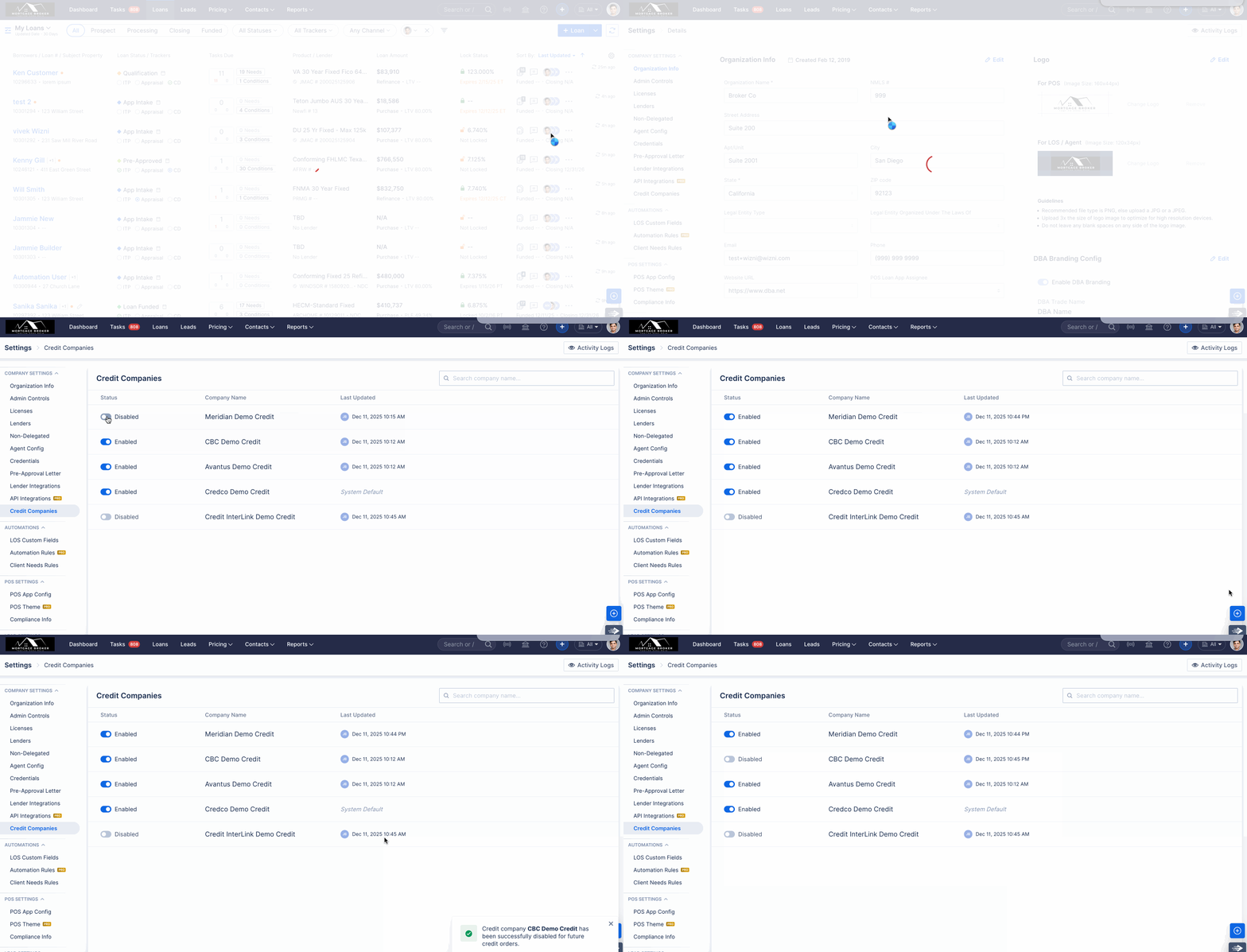
Credit vendor management has been enhanced with a dedicated Credit Companies tab in Company Settings, providing clearer control and visibility for administrators.
A new Credit Companies tab is now available in Company Settings, visible only to Company Admin and Associate Admin users.
Credit vendors that are disabled will no longer appear anywhere in the system, including User/Company/Branch Credentials, AUS, Order Credit, and Flood Certificate workflows.
Any updates made to a Credit vendor at the company level are automatically applied to all branches.
If a Credit vendor is disabled and later re-enabled, users must re-enter their credentials before they can use that vendor again.
All Credit vendors are enabled by default.
Mortgage Electronic Registration System (MERS) Registration: Support Added for Non-Delegated Loans. (HOT-36550)
We’ve introduced MERS registration support for Non-Delegated loans when the Loan Status is Clear to Close or higher, making the process more controlled and transparent.
New registration control in Funding Revenue – A “Registered with MERS” checkbox is now available for eligible Non-Delegated loans. Selecting it initiates the MERS registration process.
Data validation before registration – Registration is only allowed when all required fields are completed with valid values, including:
Firm Closing Date (today or past date only), Loan Amount, Lien Position, Property Type, Subject Property, Borrower Name, and Borrower SSN.Clear error feedback on failures – If MERS registration fails, the system now displays the specific failure reason returned by the MERS service, helping users correct issues quickly.
Post-registration – After successful registration, the MERS Number and Firm Closing Date remain fixed in the MERS portal, even if those fields are later edited on the loan in ARIVE. If the Loan Status changes or the Loan Type is updated from Non-Delegated to Broker, the MERS registration section is no longer shown.
Tracker flexibility update – The MERS Transfer field is now editable starting from Clear to Close, instead of only after the loan reaches the Funded stage.
Compliance Report: Generate In-App PDF with No Customer Billing. (HOT-38356)

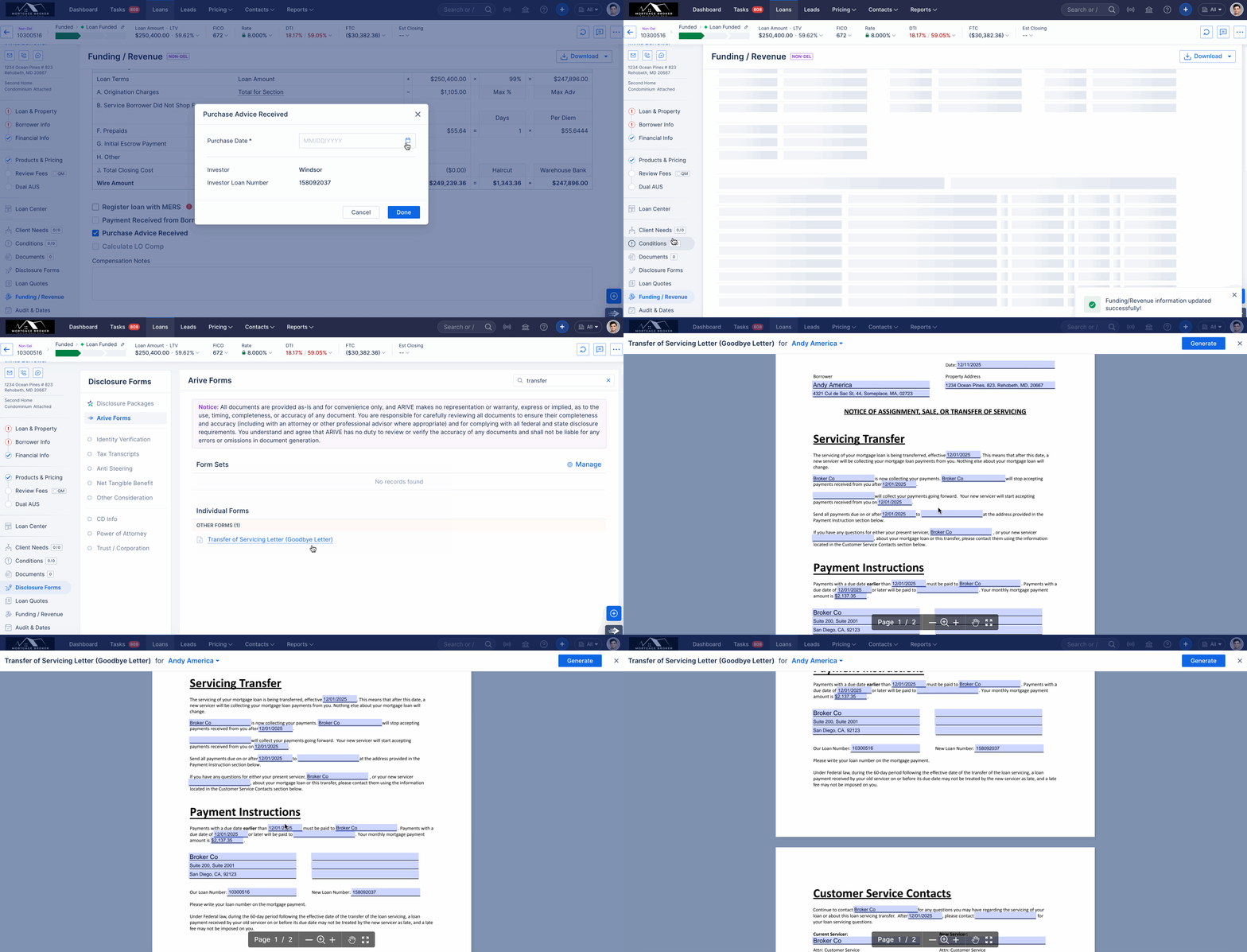
ARIVE Disclosures: A new form, “Transfer of Servicing Letter (Goodbye Letter),” has been added to the system. (HOT-18733)
A new Transfer of Servicing Letter (Goodbye Letter) form has been added to ARIVE. This form is generated individually for each borrower and automatically determines key details such as borrower address, lender/investor information, and monthly payment based on defined rules.
The Goodbye Letter is available as a new ARIVE form and generates separately for each borrower.
Borrower mailing address logic:
If Occupancy = Primary, the subject property address is used.
If Occupancy = Second Home/Investment, the borrower is a Co-signer, or Borrower Declarations → “Will you occupy as primary?” = No, the borrower’s mailing address is used.
Transfer Date is pulled from the Purchase Advice Date for Non-Delegated loans (Funding/Revenue tab).
Lender and servicing address details are sourced from Company Settings; branches inherit data from the organization’s Company Settings.
If DBA branding is enabled, the DBA information is used on the form.
A new Servicing Contact section under Company Settings → Lenders → Contact Info → Servicing Contact is used to populate the Investor address.
Investor name and address are pulled from the Product Applied in Product & Pricing:
Investor Name → Lender Mortgagee Legal Name
Investor Address → Servicing Address under Lender Contact Info
Mortgagee Clause is pulled from Lender → Mortgagee Clause → Homeowner Insurance.
The Loan Number shown on the letter is the ARIVE Loan Number.
All information related to the new service provider is left blank and editable, allowing users to fill it in while generating the form.
Monthly Payment on the letter is calculated based on impound waiver options (always ignoring Other Financing, Association Dues, and Other):
Hazard Insurance Waived → First Mortgage + Property Taxes + MI
Property Taxes Waived → First Mortgage + HOI + Supplemental + MI
None Waived → First Mortgage + Property Taxes + HOI + Supplemental + MI
All Waived → First Mortgage + MI
Automation Rules: Added “Lead Source” & “Lead Provided By” to the “Loan Info” trigger. (HOT-38474).

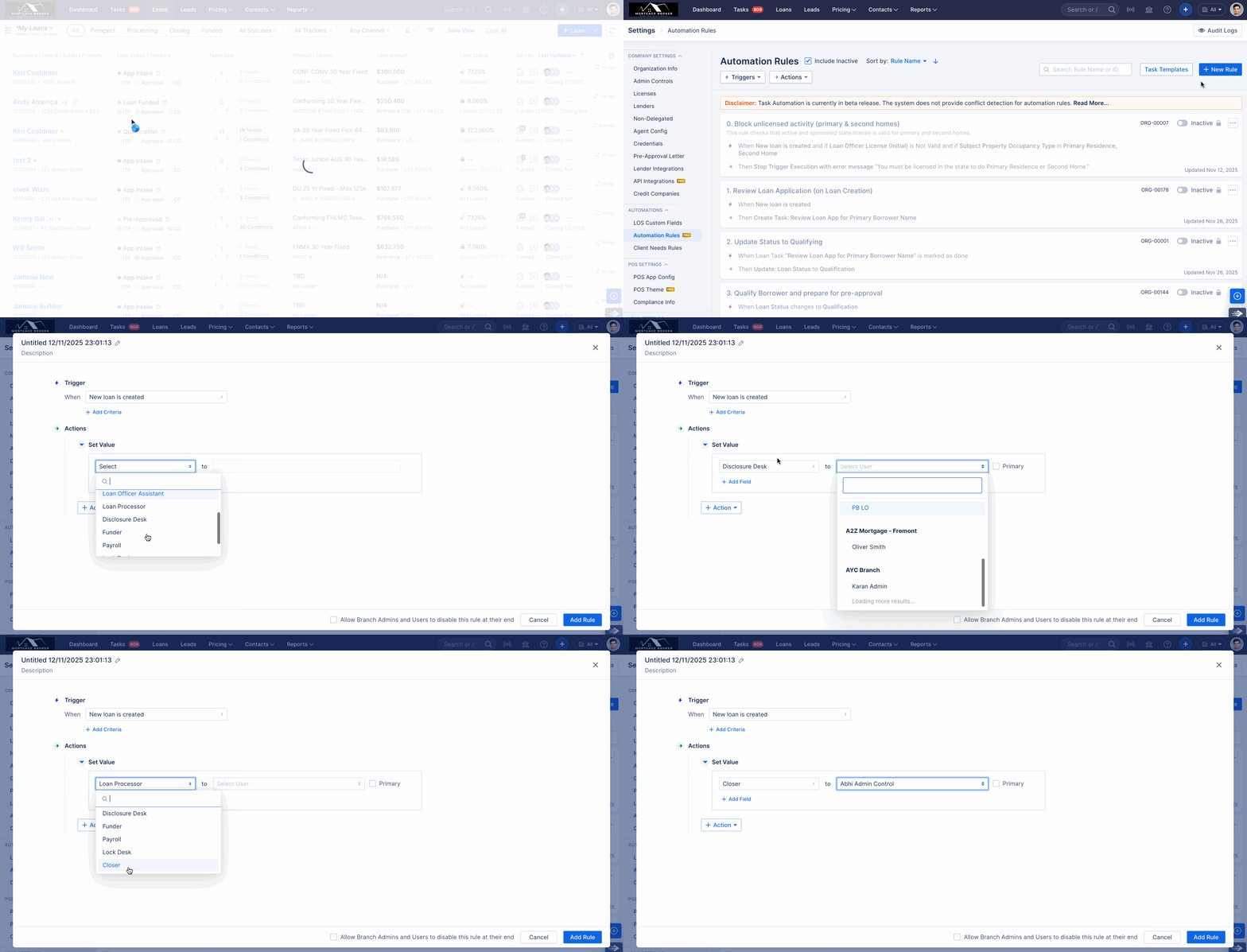
Automation Rules: Added support for additional roles in the 'Set Value' action. (HOT-36106).
As part of this update, the Disclosure Desk, Funder, Payroll, Lock Desk, and Closer roles have been added to the Set Value in Actions.
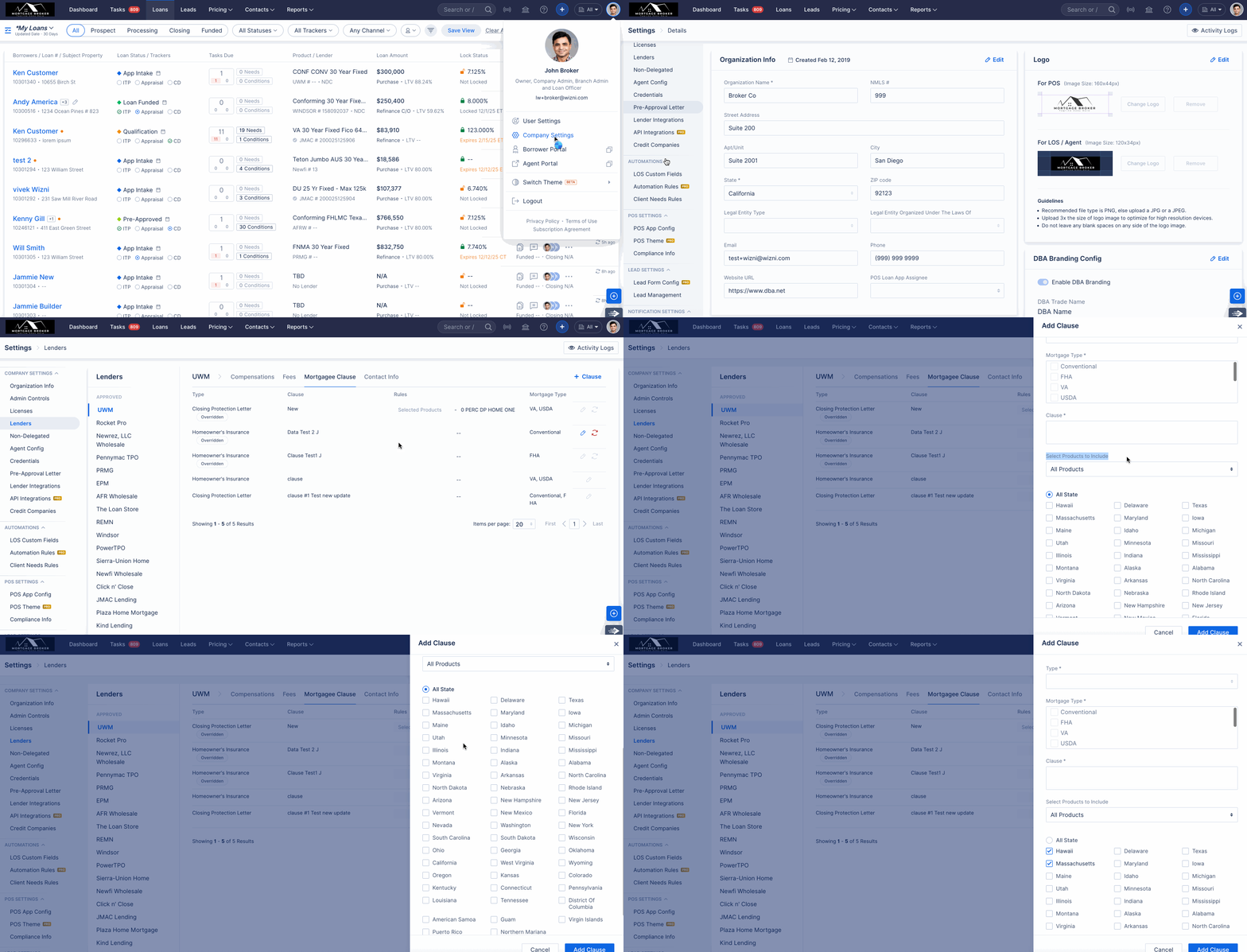
Mortgagee Clause: Added State, Product Family Code fields to the configuration. (HOT-37074)
We’ve enhanced Mortgagee Clause configuration with new fields and clearer applicability rules.
New fields added:
State and Product Family Code are now available for clause configuration.
For Manual Lenders, only the State field has been added.
Functional logic:
If State is not selected, the clause applies to all states.
If Product Code or Product Family Code is not selected, the clause applies to all products.
Mortgagee Clauses now apply correctly based on State and Product Code rules.
Clause creation now enforces a unique combination of selected fields to prevent duplicate clauses.
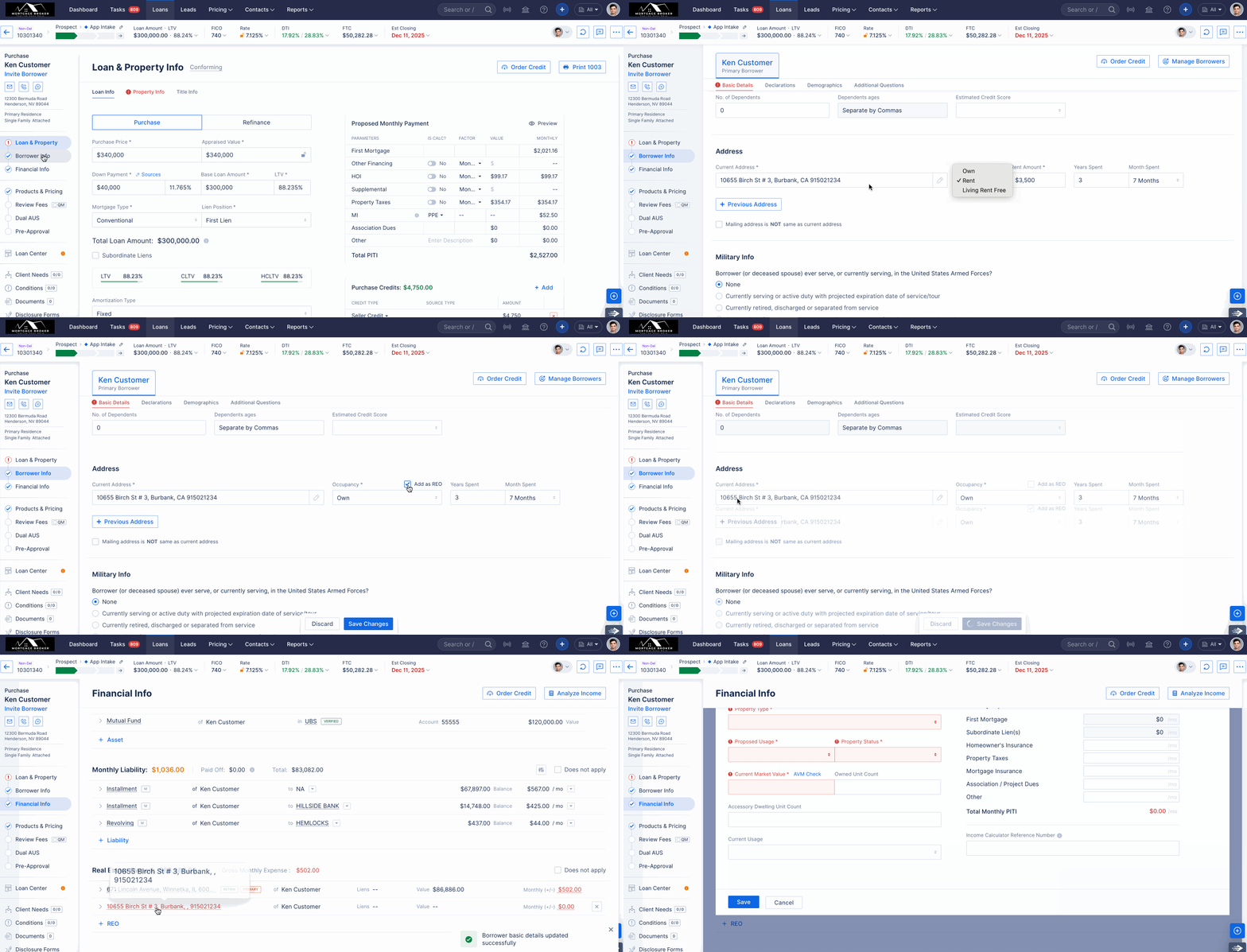
Provided an option to create an REO from the borrower’s current address. (HOT-36361)
For Purchase loans, when editing the Current Address:
If Occupancy is set to Own, an “Add as REO” checkbox is now displayed.
When this checkbox is selected and the loan is saved, the borrower’s current address is automatically created as an REO.
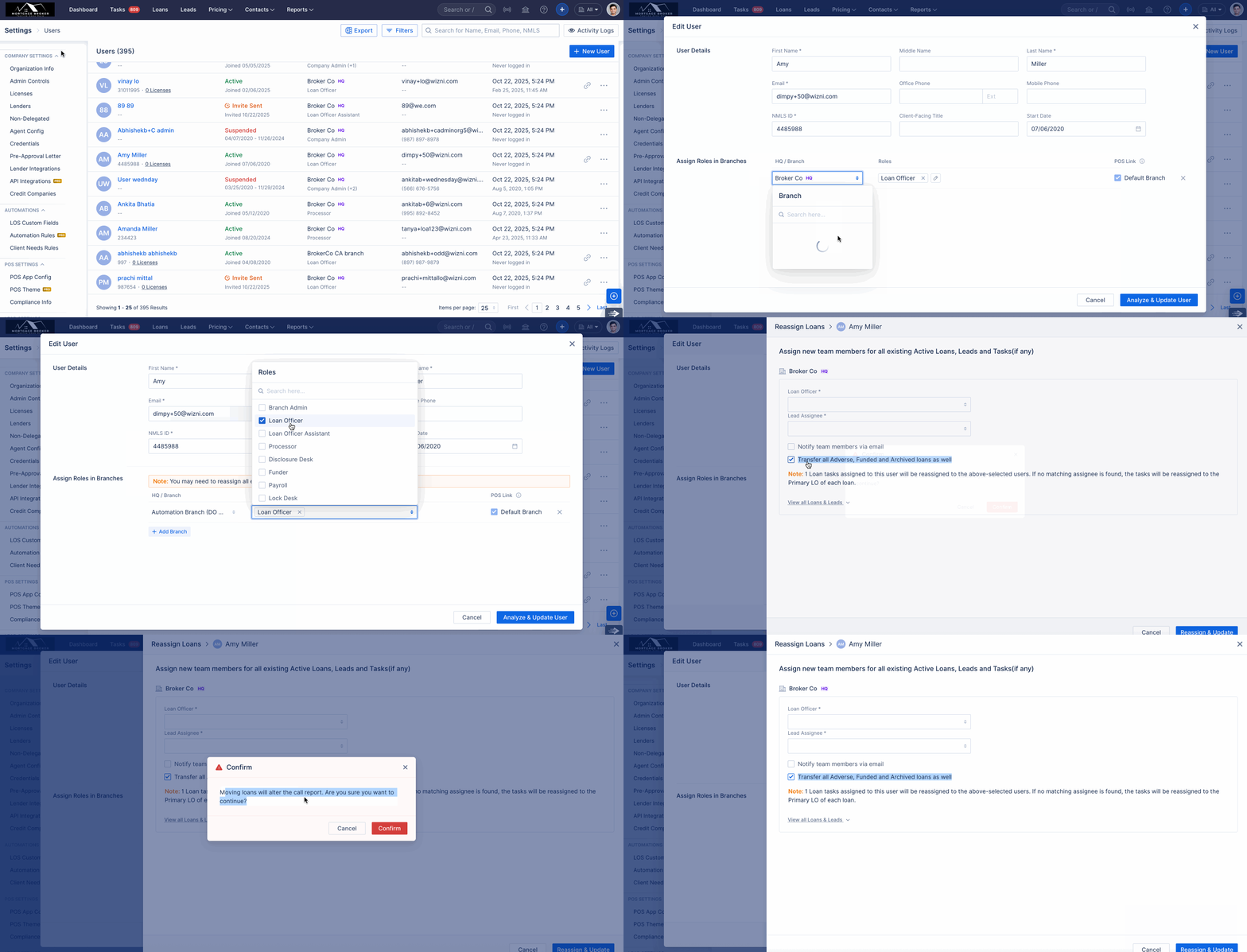
User Management- Option added to allow funded loans to remain in the original branch when a user is moved to a new branch. (HOT-38429)
We’ve added more control when changing a user’s role or branch assignment.
When changing a user’s role or branch, a new checkbox allows you to transfer all active and closed loans to the new user.
If the checkbox is not selected, closed loans (Funded, Adverse, Archived) remain assigned to the original user in the same branch.
This behavior does not apply to Delete/Deactivate User actions.
When a user is moved to another branch and funded loans are not transferred, that user will appear as disabled on those loans.
MINOR FIXES / ENHANCEMENTS
API: Added support for prepayment-related fields in Zapier and the direct API. (HOT-38373)
We’ve expanded the Get Loan Details API in both Zapier and Direct API:
Added three new response fields: Pre-Pay Penalty, Penalty Term, and Penalty Amount (for Get Loan Details API only).
When Pre-Pay Penalty is unchecked, the Penalty Term and Penalty Amount fields are not returned in the response.
Mortgagee Clause: Added a Reverse Mortgage option to the configuration. (HOT-37864)
A new Reverse Mortgage type option has been added under Company Settings → Lenders → Mortgagee Clause, and is available for both Approved and Manual lenders.
Call Reports: Included New Jersey (NJ) in MCR for SSSF reporting. (HOT-38090)
Added New Jersey (NJ) to MCR SSSF reporting, which will now include all investment-type loans for the state of New Jersey.